-A6-
5. Operation
5.1 Charging the Battery
When you receive battery, its capacity may not be sufficient. Please charge fully before
using.
Insert battery into battery charger slot. The charging process and error functions are
indicated by a green and a red light . For detailed information, refer to the operating
instructions for the battery and battery charger.
Charging times:
Recharging of empty battery: approx. 20 to 45 minutes
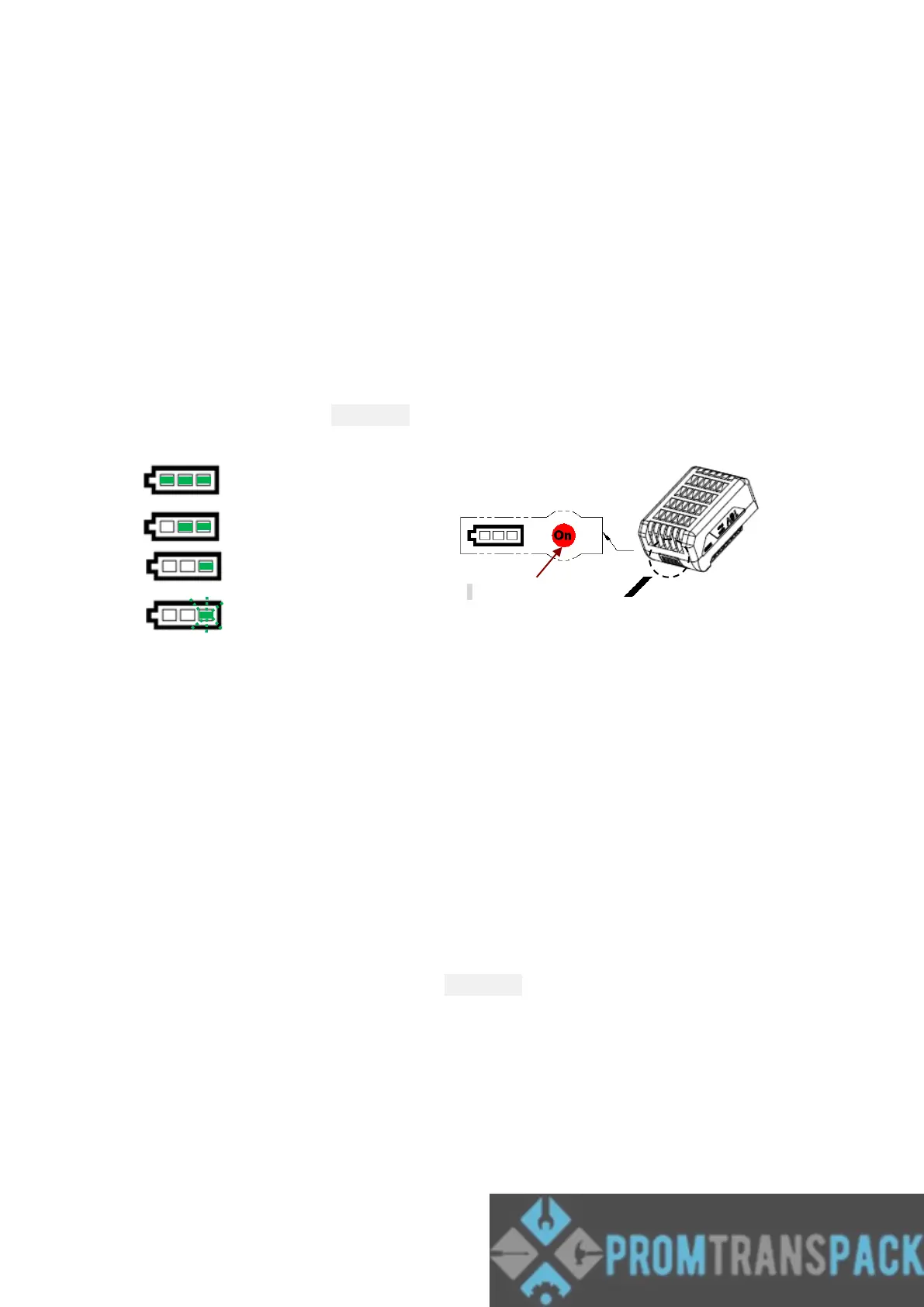
Battery is equipped with fuel gauge . Press button to check the status of capacity, as shown
on Fig. a
70-100 % capacity
40-69% capacity
10-39% capacity
lower than 10%
Caution!
Remove battery from charger upon charging process is completed. Otherwise, it may shorten
battery’s service life due to over-charging.
In order to achieve the best charging capacity, after tool exhausted battery power, please wait
until the battery has cooled down before recharging.
Remove battery from tool when tool is not in use.
Storage Notice:
Battery does not require a full charge before storage,every 6 months under normal
temperature and environment, check the fuel gauge if only one LED lights up, please charge
about 10 min. until two LEDs light up.



 To Next Page