
 To Next Page
R
Richard TrujilloSep 23, 2025
What to do if MPU does not respond on Kutai electronics Control Unit?
- Mmelissa50Sep 23, 2025
If the MPU does not respond on the Kutai electronics Control Unit, you can: * Change the MPU. * Correct any errors.

What to do if MPU does not respond on Kutai electronics Control Unit?
If the MPU does not respond on the Kutai electronics Control Unit, you can: * Change the MPU. * Correct any errors.
What to do if Kutai electronics Control Unit responds but starter motor does not?
If the Kutai electronics Control Unit responds normally, but the starter motor does not, consider these solutions: * Change the battery. * Correct any errors. * Change the starter motor assisting relay.
Why does Kutai electronics Control Unit fail to start even when the starter motor responds normally?
If the starter motor responds normally, but the Kutai electronics Control Unit fails to start and the panel indicates a start failure, you might: * Add fuel. * Reset to correct stop settings. * Change the governor or actuator. * Change the fuel solenoid.
What causes low oil pressure warning on Kutai electronics Control Unit?
If the Kutai electronics Control Unit module shows a low oil pressure warning during operation, you can: * Add lubricant to the correct level. * Change the oil pressure switch.
How to fix Kutai electronics Control Unit when starter motor disengages immediately?
If the starter motor disengages immediately during cranking and the Kutai electronics Control Unit can't start, try these solutions: * Change the battery. * Correct any errors. * Change to a suitable oil pressure switch or cancel the oil pressure switch to confirm start.
How to troubleshoot preheat not responding on Kutai electronics Control Unit?
If the preheat function does not respond on the Kutai electronics Control Unit, you can: * Correct the internal setting.
Why contactor does not execute on Kutai electronics Control Unit?
If the contactor cannot execute under normal operation with the Kutai electronics Control Unit, you can: * Correct the internal setting. * Change the load contactor.
Why does Kutai electronics Control Unit show under voltage failure with normal voltage?
If the single-phase system voltage is normal, but the Kutai electronics Control Unit module shows an under voltage failure warning, you can: * Correct the internal setting. * Change the fuse.
What to do if frequency can not be read on Kutai electronics Control Unit?
If the frequency cannot be read under operation on the Kutai electronics Control Unit, you can: * Change the AVR. * Change the fuse.
Why does Kutai electronics Control Unit stop when starter does not respond?
If the Kutai electronics Control Unit executes a stop when the starter does not respond, the following steps can be taken: * Correct the internal setting. * Change the oil pressure switch. * Change the GCU exclusive oil pressure sensor.
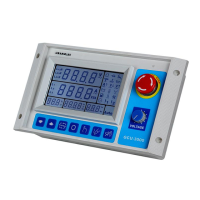
Describes the layout of controls and indicators on the GCU-3000 front panel.
Details the physical arrangement of buttons, screen, and connectors on the front.
Provides physical dimensions of the GCU-3000 and required panel cut-out.
How the generator operates automatically via remote start signals.
Step-by-step guide for manual start, stop, and operation.
Procedures for shutting down the generator and resetting the system.
Covers DC input power, system programming, and hour meter settings.
Details AC voltage, current, overload protection, and shutdown override.
Covers optional sensors, PC communication, idle function, and screen viewing.
Explains CANBus module and the comprehensive system setting programming table.
A table listing universal failure icons and their associated actions.
Explains the behavior and indication of warning conditions.
Details the process and implications of major failure shutdowns.
Detailed breakdown of each terminal pin, its function, and connection.
Visual diagrams for 3-phase 4-wire, 3-phase 3-wire, 1-phase 3-wire, and single-phase systems.
Covers issues with GCU response, starter motor engagement, and engine start failures.
Addresses problems with temperature, oil pressure, and frequency readings.
Solves overload, low oil pressure, and high temperature warnings.
Diagnoses over/under voltage, speed issues, and shutdown failures.
 General
| Brand | Kutai electronics |
|---|---|
| Model | GCU-3000 |
| Category | Control Unit |
| Language | English |