Paper
1-23
4
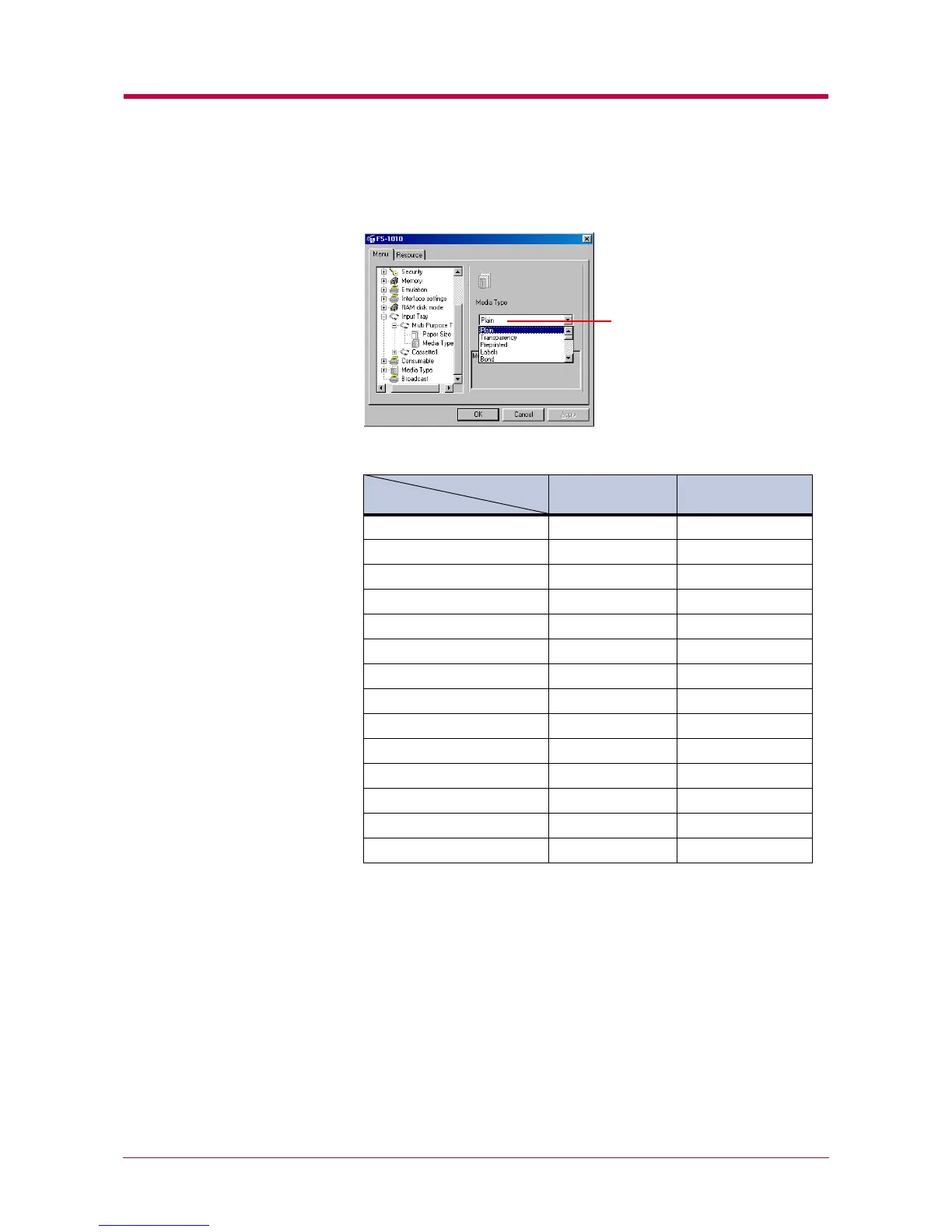
Click the ▼ button next to the pull-down menu on the right side of
the screen. Select a paper type.
Refer to the following table for paper type that can be set.
* This is a paper type defined and registered by the user. Up to eight types of user
settings may be defined. For details, see section
1.4.7
1.4.7 1.4.7
1.4.7 Setting the Weight of the
Setting the Weight of the Setting the Weight of the
Setting the Weight of the
Custom Paper Type
Custom Paper TypeCustom Paper Type
Custom Paper Type
on page
1-25
1-25 1-25
1-25
.
5
To make the paper type settings for the Cassette 1, select and double
click Cassette 1 and repeat the above procedure.
6
After you have selected a paper type, click the OK button to return to
the start-up screen. The paper type for each paper source settings
are changed.
Paper Source
Paper SourcePaper Source
Paper Source
Paper Type
Paper TypePaper Type
Paper Type
MP Tray
MP TrayMP Tray
MP Tray Paper Cassette
Paper CassettePaper Cassette
Paper Cassette
Plain !!
Transparency !"
Preprinted !!
Labels !"
Bond !!
Recycled !!
Vellum !"
Rough !!
Letterhead !!
Color !!
Prepunched !!
Envelope !"
Cardstock !"
Custom 1 (to 8)* !!
!
: Can be stored " : Cannot be stored
Media type


 To Next Page