Installing the Printer Driver
2-8
Confirming the Installation
After you restart the printer, follow the instructions below to make sure if
the printer driver has been installed correctly.
1
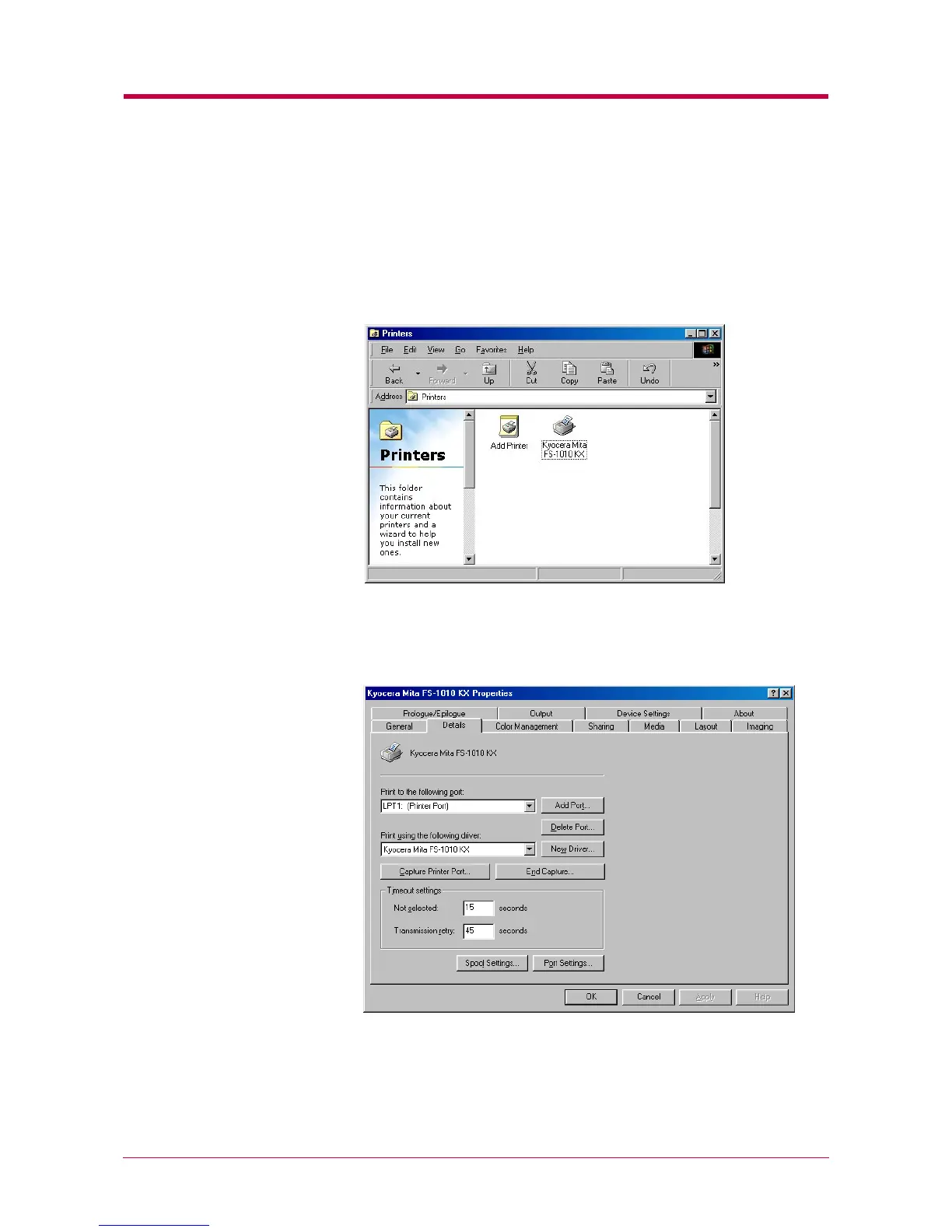
Click the Windows Start button, point Setting, and click Printers to
make sure the Kyocera Mita FS-1010 KX icon has been added to the
Printers window.
2
Right click the Kyocera Mita FS-1010 KX icon and select Properties.
The following dialog will open. Click the Details tab to make sure
the port you have selected in
step 11
step 11 step 11
step 11
on page
2-6
2-62-6
2-6
is shown in the
Print to the following port list.
Click the OK button to close the window. Proceed to section
2.2
2.2 2.2
2.2
Setting Up the Default Properties
Setting Up the Default PropertiesSetting Up the Default Properties
Setting Up the Default Properties
on page
2-16
2-16 2-16
2-16
to make default
settings.


 To Next Page