—
10
—
“ ” is displayed on the lower right side for low battery warning
and “1” is displayed only at the highest digit for overrange
indication.
② Data Hold Button
Allows for easy reading in dimly lit or hard-to-reach-locations. The
display can be observed away from the conductor after pushing in
the button. Data hold can be released by pushing the button again
after the reading is taken. Symbol “
” is displayed on the LCD.
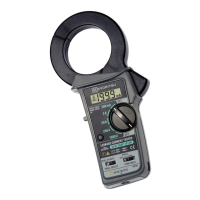
③ Two-way Analogue Output Terminal
AC current picked up by transformer jaws ⑦ is converted and
output as AC and DC voltage output. (See Analogue Output in
section 3, Specifications.) Insert output cord Model 7073 into this
terminal for monitoring waveform with an oscilloscope or
connecting to a recorder.
④ Safety Hand Strap
Prevents the instrument from slipping off the hand during use.
⑤ Power Function/Range Switch
Selection function and range. It is also used to turn power on or off.
#
CAUTION
Always set the Power Function/Range Switch to the OFF position
after use.
⑥ Jaw Trigger
Operates transformer jaws ⑦. Press to open the jaws.
⑦ Transformer Jaws
Pick up the current flowing through the conductor.
⑧ Peak Hold Selector Switch
Selects 10ms or 100ms response time. Symbol “
” is displayed
on the LCD. Set the switch back to the OFF position to release
peak hold or make normal measurements.
⑨ Frequency Selector Switch
Makes frequency response selection. Symbol“
”or“ ” is
displayed on the LCD.
⑩ Barrier
It is a part providing against electrical shock and ensuring the
minimum required air and creepage distances.
⑪ Back Light Button
When the “Back Light Button” is pressed, the LCD back light will be
on.
It will be automatically off after about 10 seconds.


 To Next Page
 Loading...