14
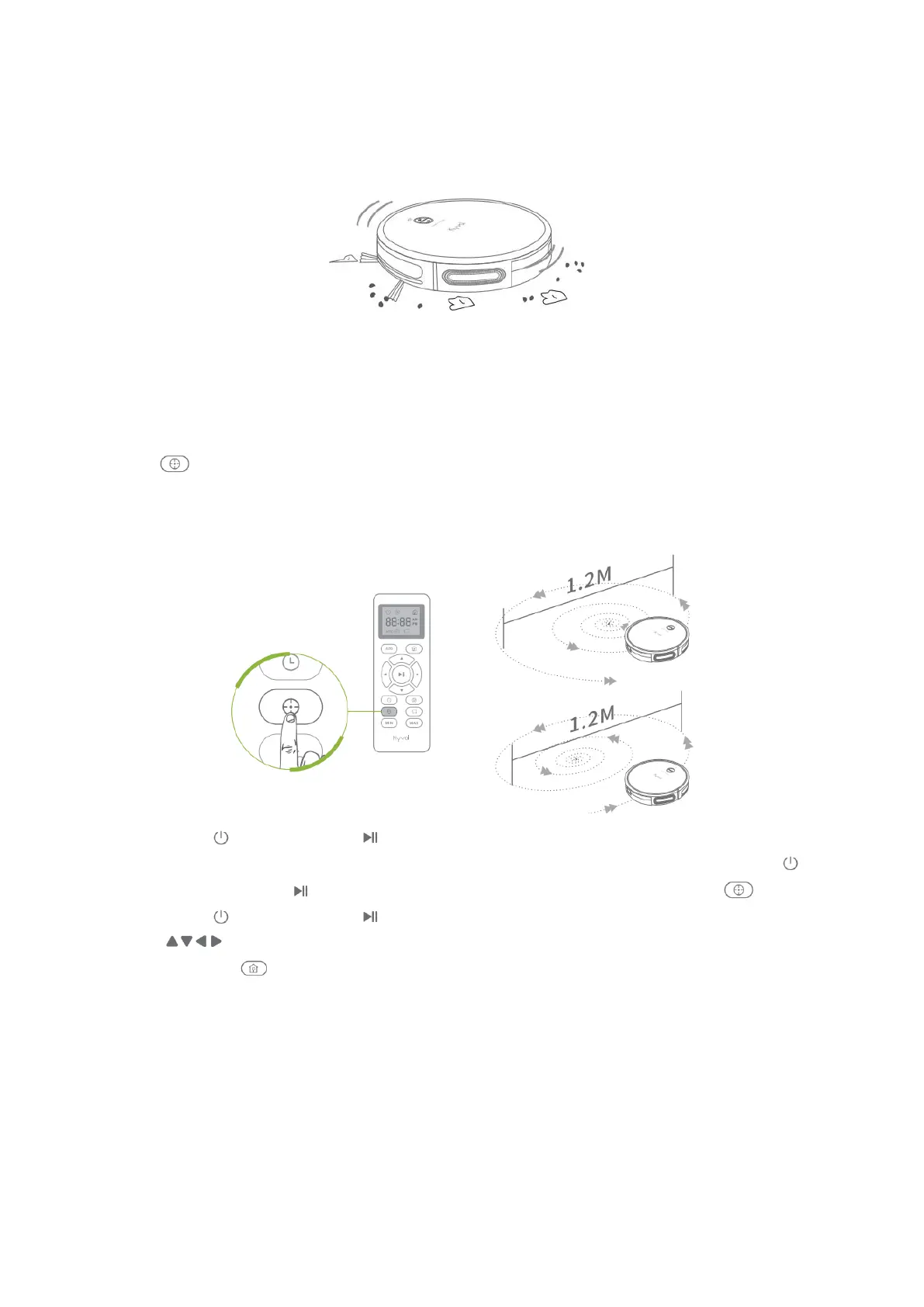
Spot Mode
This cleaning mode aims to intensively clean a specific area.
Step 1:
Locate any area where needs to be cleaned intensively, namely there exist much debris
or dust the move the robot to the center of the area.
Step 2:
Press to initiate the spot cleaning process in a spiral pattern. The maximum
diameter of the spiral circle is around 1.2 meter (3.9ft). The process will last around 2
minutes, then the robot will go into standby mode if no any operation is resumed.
• Press on the robot or on the remote to pause the current cleaning process,
press again to switch to Auto Mode. If you´d like to resume spot mode, press
on the robot or on the remote to pause the auto mode, then press again.
• Press on the robot or on the remote to pause cleaning process, then press
on the remote to manually adjust the direction of the Cybovac.
• Press on on the robot or the remote to get it back to the Charging Base.
Tips:
1. When the battery gets low, the robot will return to the Charging Base to make a
self-charging. We recommend to fully charge the robot, the operate it as needed.
If no cleaning plans, please let the robot always connect with the Charging Base.
2. If the robot is not managed to find the Charging Base due to obstacles or getting
stuck, please manually get it to contact with the Charging Base.


 To Next Page