ESI-500
Pilot’s Guide 3-1
Display Features
Introduction
CHAPTER 3
DISPLAY FEATURES
This chapter provides an explanation of the display features and
variations based on individual aircraft conguration options chosen at
installation.
This chapter provides details on the display features of the ESI-500.
Included is information on available conguration options.
Attitude
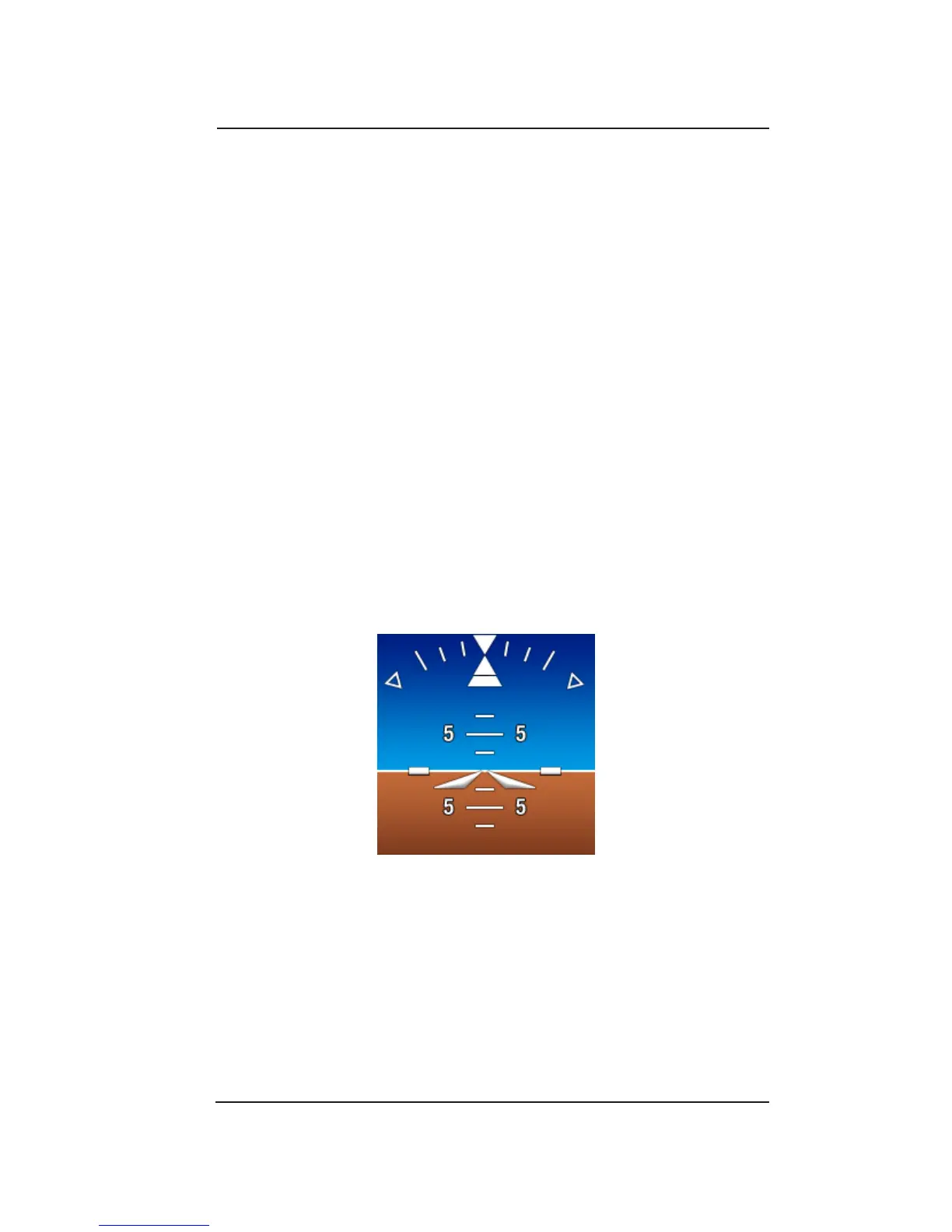
Attitude information consists of an articial horizon (sky (blue), ground
(brown)), pitch ladder, roll indicator, and aircraft reference symbol.
See Figure 3-1.
Conguration Options:
• Sky and ground color background with gradient shading.
• Roll indicator is either xed (scale moves) or moveable (pointer
moves).
Figure 3-1: Attitude Display Features
Attitude Background
The attitude background is divided into an upper blue sky and lower
brown ground with the horizon line located where the sky and ground
backgrounds meet. The attitude background moves up/down and
clockwise/counter-clockwise around the bore-sight of the aircraft
reference symbol in relation to the pitch and roll of the aircraft.


 To Next Page