WI-FI WIND & WEATHER STATION Page | 15
PRESSUR E
MP H
WIND
SPEE D
DIRECTIO N
10 2 3 4 5 6 7 8 9 10 15
20 25+
PRESSURE
MP H
WIND
SPEE D
DIRECTIO N
10 2 3 4 5 6 7 8 9 10 15
20 25+
MP H
WIND
SPEE D
DIRECTION
10 2 3 4 5 6 7 8 9 10 15
20 25+
1
HR
EXTR A SENSOR
MP H
WIND
SPEE D
DIRECTIO N
10 2 3 4 5 6 7 8 9 10 15
20 25+
1
HR
EXTR A SENSOR
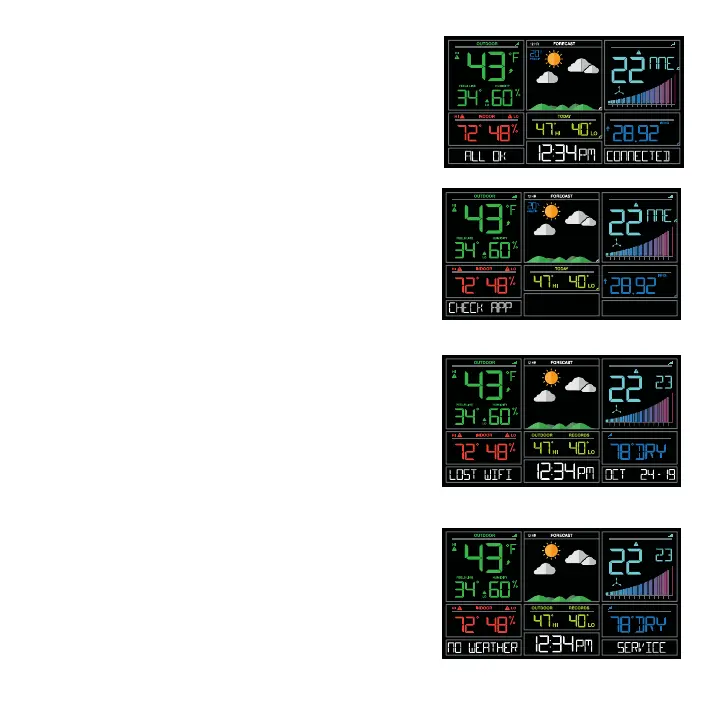
LOST WIFI
• Check your power cord connection (power cord
required to connect)
• When trying to reestablish your station’s Wi-Fi
connection, be sure your mobile device is on the
same 2.4GHz network you want your station to use.
• Check your network connection.
• Hold the + and – buttons together for 3 seconds to
search for Wi-Fi.
NO WEATHER SERVICE
• Wi-Fi, and App are fine.
• Weather/Time service not connecting. This will be
resolved at the Weather Server. Please be patient.
• Weather Forecast, Precipitation and Internet
HI/LO temperature will not be displayed.
ALL OK CONNECTED
• Station is connected all the way through to the
La Crosse View app.
CHECK APP
• The Wi-Fi router connection is working.
• Check your connection to the La Crosse View app.
• Check Notifications in the La Crosse View app
• Is there an update to install?






 To Next Page