WI-FI WIND & WEATHER STATION Page | 5
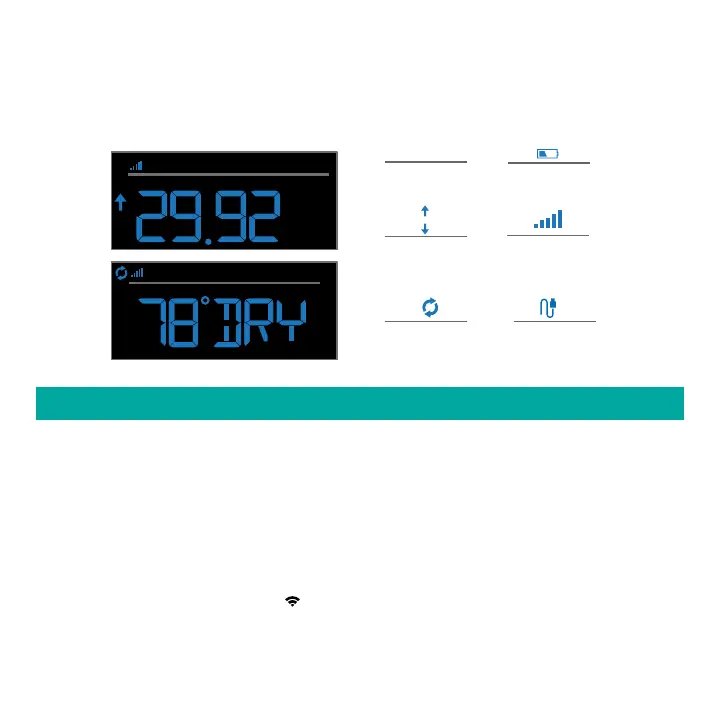
EXTRA SENSOR AREA ICONS:
• The Extra Sensor area of your station will default to Pressure when you first power up.
• When you choose to add additional sensors, the Sensor Reception Indicator will show in the
upper left corner whether Pressure or Sensor reading is displayed.
• Press and release the EXTRA button to view any additional sensors.
Low Battery
Indicator
Sensor
Reception
Inches of Mercury
or Hecto Pascal
INHG / HPA
Pressure
Trend Arrows
Auto Scroll
Pressure/Sensors
Probe
Reading
PRESSURE
INHG
EXTRA SENSOR
CONNECT TO LA CROSSE VIEW™ APP
MOBILE DEVICE REQUIREMENTS
iOS Requirements:
Mobile device with iOS with cellular or Wi-Fi service
Android Requirements:
Mobile device with Android OS with cellular or Wi-Fi service
GET YOUR STATION READY
Ensure your station’s Wi-Fi Indicator is flashing. If it is not, press and hold the Plus (+) and
Minus (–) buttons down together until it begins flashing. This tells you that your station is ready
to connect.






 To Next Page