WI-FI WIND & WEATHER STATION Page | 17
You can set your backlight to automatically dim to level 1 at a set hour for sleeping, then auto-
matically return to full brightness when you wake.
Set Auto Dim (Hour only):
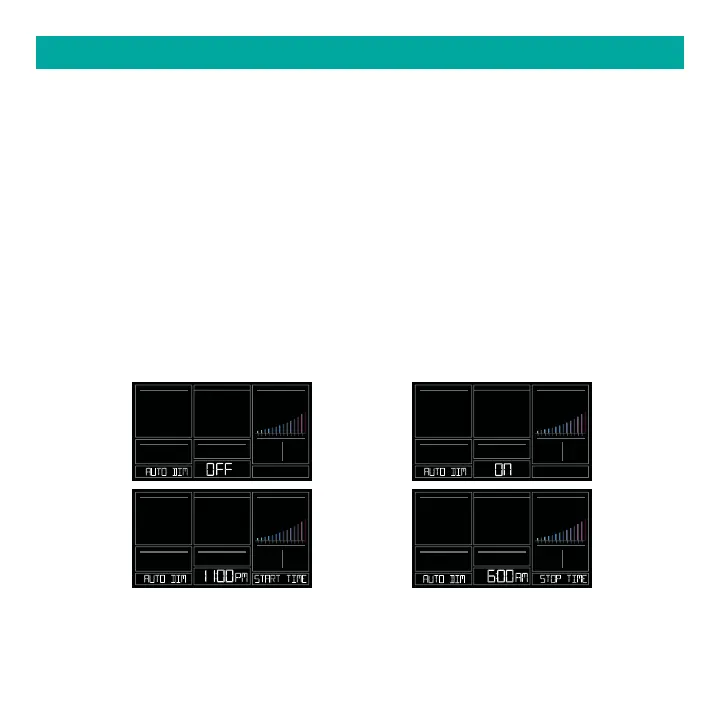
1. Hold the LIGHT button 2 seconds to enter dimmer set mode. AUTO DIM OFF will show.
2. Press the + or – buttons to turn dimmer (ON). AUTO DIM ON will show.
3. Press the LIGHT button to select start time (Hour) for dimmer. AUTO DIM START TIME and
the hour will flash.
4. Press the + or – buttons to change the hour for the dimmer to be low light level.
5. Press the LIGHT button to select start time for dimmer to be on High light level. AUTO DIM
STOP TIME and the hour will flash.
6. Press the + or – buttons to change the hour for the dimmer to be high light level.
7. Press the LIGHT button to confirm exit.
Note: Hold LIGHT button at any time to exit dimmer settings.
AUTO DIMMING BACKLIGHT
10 2 3 4 5 6 7 8 9 10 15
20 25+
10 2 3 4 5 6 7 8 9 10 15
20 25+
10 2 3 4 5 6 7 8 9 10 15
20 25+
10 2 3 4 5 6 7 8 9 10 15
20 25+
Note: If you press the LIGHT button to manually adjust the backlight, the Auto Dim feature will
resume at the next scheduled time to dim.






 To Next Page