WI-FI WIND & WEATHER STATION Page | 22
10 2 3 4 5 6 7 8 9 10 15
20 25+
MPH
WIND
TOP
10 2 3 4 5 6 7 8 9 10 15
20 25+
MPH
WIND
TOP
10 2 3 4 5 6 7 8 9 10 15
20 25+
MPH
WIND
TOP
10 2 3 4 5 6 7 8 9 10 15
20 25+
MPH
WIND
TOP
10 2 3 4 5 6 7 8 9 10 15
20 25+
MPH
WIND
1
HR
TOP
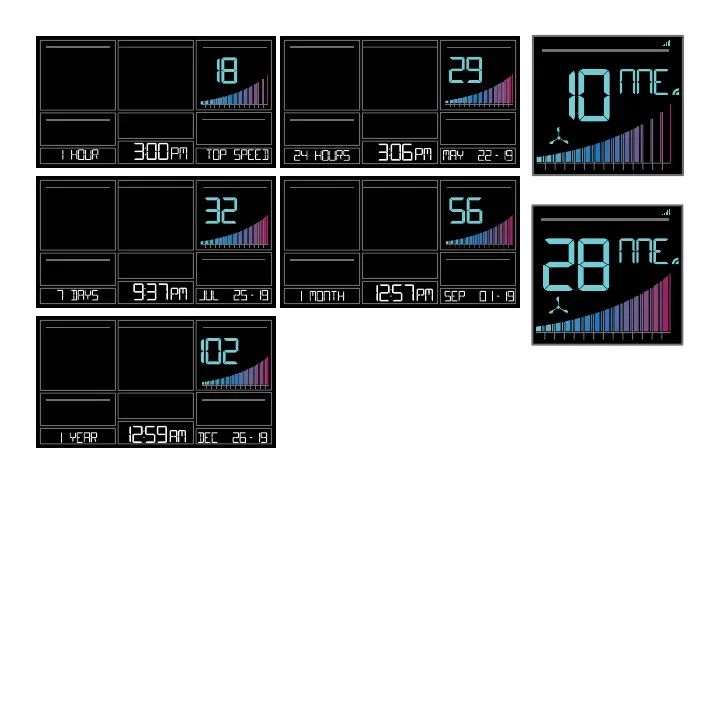
Reset Wind Speed History:
1. Press the WIND button to view individual wind speed readings.
2. Hold the MINUS button for five seconds to reset the individual value.
3. Wind speed reading will reset to current wind speed, time and date.
Wind Speed Graph
• The Wind Speed graph will fill with color as a visual indicator of wind speed.
• At speeds above 25MPH the graph will remain full.
10 2 3 4 5 6 7 8 9 10 15
20 25+
WIND
SPEED
DIRECTIO N
MP H
10 2 3 4 5 6 7 8 9 10 15
20 25+
MP H
WIND
SPEED
DIRECTIO N
Graph 10 mph Wind Speed
Graph 28 mph Wind Speed






 To Next Page