WI-FI WIND & WEATHER STATION Page | 28
Your station and each sensor have a unique ID number that will identify them in the La Crosse
View app. This has the added bonus of locking them into your weather station until you
manually delete them.
View ID numbers in station:
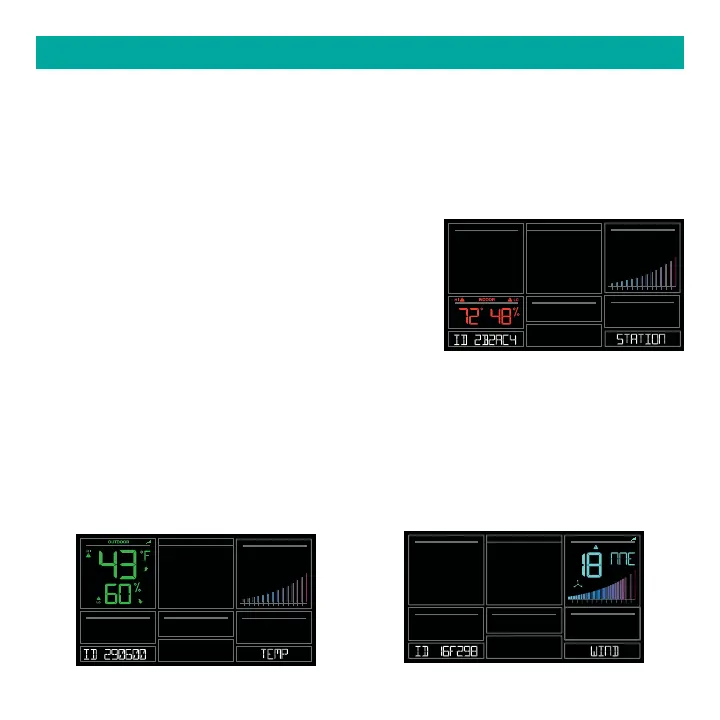
Press and release the SENSOR button. The ID number and type will show on the bottom of
the station.
• Station
• TH Sensor
• Wind Sensor
• Extra Sensor (if connected to station)
Search for Individual sensors:
1. Press and release the SENSOR button to view sensor type and ID.
2. Hold the PLUS (+) button to search for the sensor. The reception indicator will flash for up to
3 minutes.
3. Allow up to 3 minutes to view sensor and ID on station.
Note: Once sensor is found search will stop. The reception indication will stop flashing.
Sensor and ID will show for 3 seconds.
SENSOR ID & SENSOR SEARCH
10 2 3 4 5 6 7 8 9 10 15
20 25+
HUMIDITY
LEVEL
10 2 3 4 5 6 7 8 9 10 15
20 25+
10 2 3 4 5 6 7 8 9 10 15
20 25+
MPH
WIND
SPEED
DIRECTION






 To Next Page