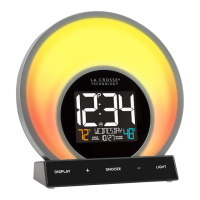
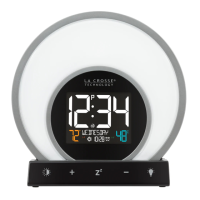
The La Crosse Technology Soluna Light Alarm Clock is a versatile device designed to enhance your daily routine with its unique blend of timekeeping, alarm, and light therapy features. This light alarm clock aims to provide a peaceful wake-up experience and help reset your circadian rhythm through its natural light alarm, which simulates a sunrise.
Function Description:
The core function of the Soluna Light Alarm Clock is to display time, temperature, and humidity, while also offering a comprehensive alarm system and various light modes. It features a 1.3-inch LCD display that shows the current time, AM/PM indicator, indoor temperature (°F/°C), indoor humidity (%), weekday, month, and date. Additionally, it includes indicators for low battery, auto-dim status, and active light and sound alarms with their respective frequencies.
The alarm system is a key component, offering both a Natural Light Alarm and a Melody Sound Alarm. The Natural Light Alarm is designed for a gradual wake-up, beginning 30 minutes before your set alarm time. During this period, the light intensity gradually increases, reaching full brightness at the alarm time. This light remains at full power until a button is pressed, providing a gentle transition into your day. The Melody Sound Alarm offers a gradual increase in volume over a 5-minute period, stopping if not snoozed or turned off. Both alarms can be programmed for daily (1-7), weekday (1-5), or weekend (6-7) frequencies, and you can set a snooze duration from 5 to 120 minutes for the sound alarm. It's important to note that only one light and one sound alarm can be programmed, and they can be set to go off together or at separate times.
Beyond alarms, the Soluna clock boasts five distinct light modes with 20 unique color options, allowing you to customize your glow for any mood or occasion. These modes include:
- Color Cycle Mode: The light gradually shifts through all available glow color options, creating a dynamic visual experience.
- Evening Mode: A 30-minute cycle that simulates a sunset, with the light gradually dimming and shifting in color as you prepare for sleep.
- Guided Breathing Mode: This mode guides you through a 10-minute deep breathing exercise, with colors changing to prompt inhales and exhales. The LCD also displays inhale and exhale times to assist you. You can choose from Energy, Warmth, or Calm glow colors for this mode.
- Comfort Meter Mode: In this mode, the light color changes based on the current indoor humidity level, offering a quick visual indicator of your home's comfort.
- Color Select Mode: This mode allows you to choose your favorite glow color from a palette of 20 options, including Red, Fire, Orange, Sun, Yellow, Garden, Green, Forest, Cyan, Ocean, Dark Blue, Night, Purple, and White.
The device also includes a 1 Amp USB charging port on its right side, allowing you to connect and charge external devices.
Usage Features:
The Soluna Light Alarm Clock is designed for intuitive operation with clearly labeled buttons and ports.
- Initial Setup: To power up, insert the 5V Power Adapter into an outlet and plug it into the AC Jack on the bottom of the clock. Remove the insulation tab from the battery compartment. A greeting will appear on the LCD, and the clock will enter the Settings Menu, initiating the Color Cycle Light Mode. The Settings Menu guides you through setting language, hour, minutes, year, month, date, and Fahrenheit/Celsius preference. Weekday will set automatically after year, month, and date are adjusted. You can use the +/- buttons on the front to adjust values and the SET button on the back to confirm and move to the next step. The Z² button allows you to exit the Settings Menu at any time. To re-enter the Settings Menu after initial setup, hold the SET button on the back.
- Button Functions:
- DISPLAY (sun icon): Tap to adjust backlight intensity (4 levels plus off) or hold to enter Auto-Dim settings.
- PLUS/MINUS (+/-): Tap to control glow light intensity or hold to adjust values quickly in menus.
- SNOOZE (Z²): Tap to snooze the sound alarm, exit menus, or turn the light off. Also used to confirm light mode selections or end light modes.
- LIGHT (light bulb icon): Tap to toggle through light modes. Tap Z² to confirm light mode selection.
- SOUND ALARM (bell icon): Press to activate or hold to enter alarm settings.
- SET (gear icon): Hold to enter Settings Menu.
- LIGHT ALARM (sun with rays icon): Press to activate or hold to enter alarm settings.
- LCD Display Brightness: Tap the DISPLAY button to cycle through 4 brightness levels or turn the backlight off.
- Auto-Dim Settings: Hold the DISPLAY button to enter the Auto-Dim Settings Menu. Use +/- buttons to turn the feature on/off, then adjust start and stop times. The AUTO DIM icon will appear on the LCD when activated.
- Setting Alarms:
- Light Alarm: Hold the LIGHT ALARM button to enter settings. Use +/- to select frequency (Daily, Weekday, Weekend), then set the desired time. The light alarm icon and frequency will appear on the LCD when active. Press the LIGHT ALARM button to view, activate, or deactivate the alarm.
- Sound Alarm: Hold the SOUND ALARM button to enter settings. Use +/- to select frequency, then set the desired time. Next, set the snooze duration (5 to 120 minutes). The sound alarm icon and frequency will appear on the LCD when active. Press the SOUND ALARM button to view, activate, or deactivate the alarm.
- Light Mode Selection: Tap the LIGHT button to cycle through the different light modes. Use +/- buttons to adjust glow color options in Guided Breathing and Color Select modes. To confirm selection and start a light mode, either tap the Z² button or wait 5 seconds. To turn off any active light mode, tap the Z² button.
- Temperature & Humidity: The clock continuously displays real-time indoor temperature and humidity. You can select Fahrenheit or Celsius in the main Settings Menu.
Maintenance Features:
The Soluna Light Alarm Clock is designed for straightforward maintenance to ensure longevity and proper function.
- Battery Backup: The device includes a backup battery (1 "CR2032" Coin Cell Battery) that saves settings and alarm functions during power outages. In the event of a power outage, the clock will keep time, and any set alarms will beep at the set time.
- Factory Reset: If you encounter issues, a factory reset option is available. Use a pen or paper clip to press the "RESET" button located on the back of the clock to restore factory settings.
- Care & Maintenance Guidelines:
- Avoid mixing old and new batteries.
- Do not mix Alkaline, Lithium, standard, or rechargeable batteries.
- Always use the correct size and grade of battery suitable for the device.
- Clean battery contacts and the device's contacts before battery installation.
- Ensure batteries are installed with correct polarity (+/-).
- Remove batteries from the equipment if it will not be used for an extended period.
- Promptly remove expired batteries.
- USB Charging Port: The integrated USB charging port provides a convenient way to charge external devices. While the charging cable is not included, the port offers 1 Amp maximum current. Charging times may vary depending on the connected device.

 Need help?
 General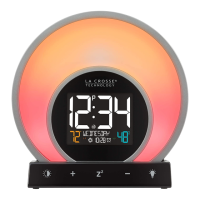


 To Next Page