16
Viewing Temperature & Humidity Data
TEMPERATURE & HUMIDITY
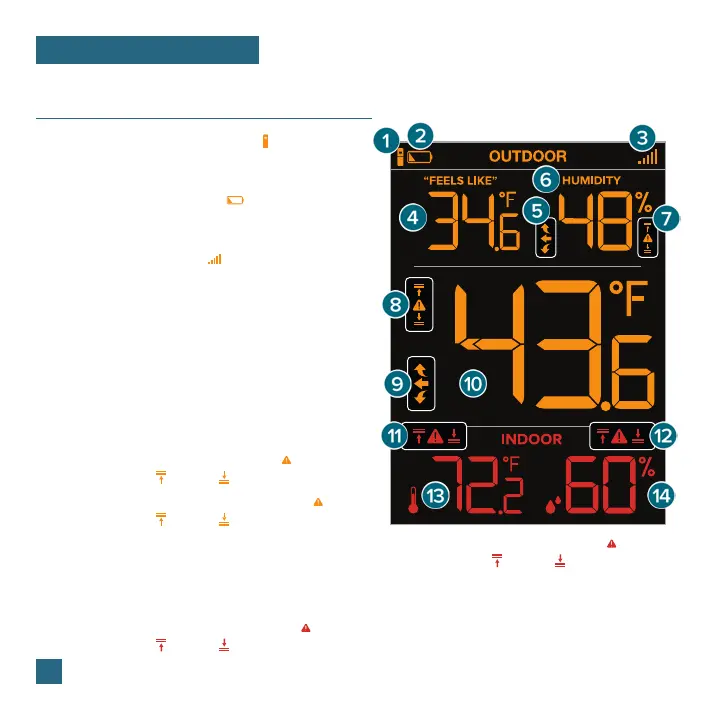
1. THERMO-HYGRO SENSOR ICON ( )
Indicates Temperature readings are coming from
a Thermo-Hygro Sensor.
2. LOW BATTERY INDICATOR ( )
Indicates the batteries in the Thermo-Hygro Sensor
should be replaced soon.
3. RECEPTION INDICATOR ( )
Indicates if the display is receiving data from
a Thermo-Hygro Sensor.
4. “FEELS LIKE” TEMPERATURE
Current Heat Index or Wind Chill when conditions
are met.
5. OUTDOOR HUMIDITY TREND ARROWS
Indicate humidity trend over the past 3 hours
6. OUTDOOR HUMIDITY
Current relative humidity
7. OUTDOOR HUMIDITY ALERT ICONS ( )
Appear if a high ( ) or low ( ) alert is set & active.
8. OUTDOOR TEMPERATURE ALERT ICONS ( )
Appear if a high ( ) or low ( ) alert is set & active.
9. OUTDOOR TEMPERATURE TREND ARROWS
Indicate temperature trend over the past 3 hours
10. OUTDOOR TEMPERATURE
Current temperature (decimal/no decimal option)
11. INDOOR TEMPERATURE ALERT ICONS ( )
Appear if a high ( ) or low ( ) alert is set & active.
12. INDOOR HUMIDITY ALERT ICONS ( )
Appear if a high ( ) or low ( ) alert is set & active.
13. INDOOR TEMPERATURE
Current temperature (decimal/no decimal option)
14. INDOOR HUMIDITY
Current relative humidity
Note: You can choose decimal/no decimal display option in the Settings Menu (see page 6).















 To Next Page