
 To Next Page
M
Martin GardnerJul 30, 2025
How to fix a faint LCD on my La Crosse Technology Clock?
- RrandolphmichaelJul 30, 2025
If the LCD on your La Crosse Technology Clock is faint, replace the batteries.

How to fix a faint LCD on my La Crosse Technology Clock?
If the LCD on your La Crosse Technology Clock is faint, replace the batteries.
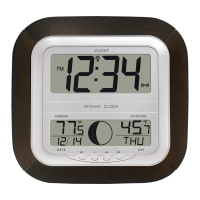
What to do if my La Crosse Technology WS-6002U isn't receiving the WWVB signal?
If your La Crosse Technology Clock isn't receiving the WWVB signal, try these steps: * Position the front of the clock towards Ft. Collins, Colorado. * Wait overnight for the signal to be received. * Ensure the clock is at least 6 feet away from electrical devices like TVs, computers, or other radio-controlled clocks. * Remove the batteries for five minutes, reinsert them, and leave the unit alone overnight without pressing any buttons.
Why is the hour incorrect on my La Crosse Technology WS-6002U Clock, but the minute and date are correct?
If the hour is incorrect on your La Crosse Technology Clock, but the minute and date are correct, ensure that the correct time zone and daylight saving time settings are selected.
What to do if “OFL” appears in the LCD of my La Crosse Technology WS-6002U Clock?
If “OFL” appears on the LCD of your La Crosse Technology Clock, it means the current surrounding temperature is outside of the measuring range. Move the clock to an area with a warmer or cooler surrounding temperature.
Step-by-step instructions for installing batteries into the atomic clock.
Guide to entering and navigating the clock's programming functions.
Instructions for selecting the correct time zone for accurate clock operation.
Details on how to enable or disable Daylight Saving Time for automatic adjustments.
How to choose the language for displaying the day of the week (English, French, Spanish).
Manual procedure for setting the hour and minute if WWVB signal is not received.
Steps to manually set the year, month, date, and day of the week.
How to switch between 12-hour and 24-hour time display formats.
Guide to selecting Fahrenheit (°F) or Celsius (°C) for temperature display.
How to cycle through different display modes showing date, seconds, and indoor temperature.
Information about where the indoor temperature is displayed and how it's updated.
Instructions on how to extend and use the built-in table stand.
Instructions for securely mounting the atomic clock on a wall.
 General
| Display | LCD |
|---|---|
| Calendar | Yes |
| Temperature Units | °F / °C Selectable |
| Snooze | Yes |
| Date Display | Yes |
| Type | Digital Atomic Wall Clock |
| Atomic Time | Yes |
| Temperature Display | Yes |
| Temperature Accuracy | ±2°F |