EasyManua.ls Logo

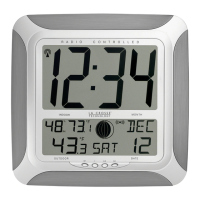
La Crosse Technology WS-8011UM - User Manual

La Crosse Technology WS-8011UM
13 pages
Print Icon
To Next Page IconTo Next Page
Loading...
B
attery
Cover
WS-8011UM with TX2U
433 MHz
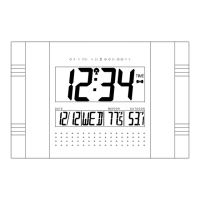
Radio Controlled Temperature Clock
Pages 2 through 12
------------------------------------------------------------------------------------
WS-8011UM with TX5U
433 MHz
Radio Controlled Temperature Clock
Pages 14 through 26


Battery
Cover
2
WS-8011UM with TX2U
433 MHz
Radio Controlled Temperature Clock
Instruction Manual

Battery
Cover

Questions and Answers

  • L
    laura43Jul 30, 2025
    Why is the hour incorrect on my La Crosse Technology Clock?
    • S
      Stephen SimonJul 30, 2025
      If the hour displayed on your La Crosse Technology Clock is incorrect, but the minute and date are correct, ensure that you have selected the correct time zone and daylight saving time settings.
  • M
    Mr. Joseph MurphyAug 4, 2025
    How to fix a faint LCD display on my La Crosse Technology WS-8011UM?
    • J
      Joanne PopeAug 5, 2025
      If the LCD screen on your La Crosse Technology Clock is faint, replace the batteries.
  • Y
    yvettealvaradoAug 9, 2025
    What to do if my La Crosse Technology Clock isn't receiving the WWVB signal?
    • D
      David Parker PhDAug 9, 2025
      If you are not receiving the WWVB signal on your La Crosse Technology Clock, try the following: * Face the front of the clock towards Ft. Collins, Colorado, to potentially improve signal reception. * Wait overnight for the signal to be received. * Ensure the clock is at least 6 feet away from electrical devices like TVs, computers, or other radio-controlled clocks. * Remove the batteries for five minutes, reinsert them, and leave the unit undisturbed overnight without pressing any buttons.
  • M
    Mr. Andrew RojasAug 15, 2025
    Why does my La Crosse Technology Clock show 'OFL' in the outdoor temperature?
    • M
      Mariah SmithAug 15, 2025
      If “OFL” appears in the outdoor temperature LCD of your La Crosse Technology Clock, it could be due to several reasons: * The remote temperature may be out of range. * Check the batteries in the remote unit. * There might be interference from an outside source, such as a cordless phone.
  • S
    schmidtchristopherAug 19, 2025
    What to do if my La Crosse Technology Clock shows '--.-' in the outdoor temperature?
    • C
      carolyn00Aug 20, 2025
      If “--.-” appears in the outdoor temperature LCD of your La Crosse Technology Clock, try the following: 1. Check the batteries in the remote unit. 2. If you replace the batteries in the remote, restart the main unit by removing all batteries and then following the start-up procedure.
  • S
    sreynoldsAug 25, 2025
    Why does my La Crosse Technology WS-8011UM display 'OFL' for the indoor temperature?
    • M
      Michael FrancoAug 25, 2025
      If “OFL” appears in the indoor temperature LCD of your La Crosse Technology Clock, it indicates that the current surrounding temperature is outside the measuring range. Move the unit to an area with a warmer or cooler surrounding temperature.

Summary

About WWVB Radio Time Signal

Quick Setup Guide

Detailed Setup Guide

Remote Transmitter Battery Installation

Steps to install batteries in the remote transmitter unit.

Temperature Clock Battery Installation

Steps to install batteries in the main temperature clock.

Program Mode Configuration

Function Buttons Overview

Identification and purpose of the device's function buttons.

Time Zone Setting

How to select the correct time zone for accurate timekeeping.

Daylight Saving Time Setting

Procedure for enabling or disabling Daylight Saving Time.

Weekday Language Selection

How to choose the display language for weekdays.

Manual Time Setting

Instructions for manually setting the clock's time.

Manual Calendar Setting

Steps to manually set the year, month, date, and weekday.

12;24-Hour Time Format

How to switch between 12-hour and 24-hour time display formats.

Temperature Unit Selection (°F;°C)

Procedure to select temperature units (°F or °C).

Features and Operations

Display Mode Customization

How to cycle through different display modes for information.

Alarm Functions

Information on setting and using the alarm features.

Setting the Alarm Time

Step-by-step guide to setting the alarm time.

Activate;Deactivate Alarm

How to turn the alarm on or off.

Activate Snooze Function

How to use the snooze function when the alarm sounds.

Suspend Alarm

How to temporarily silence the alarm.

Indoor Temperature Display

Where to find and how the indoor temperature is displayed.

Remote Temperature Display

How outdoor temperature is received and displayed.

Mounting Instructions

Using Foldout Table Stands

How to deploy and use the built-in table stands.

Wall Mounting Guide

Steps for securely mounting the clock on a wall.

Remote Temperature Transmitter Installation

Transmitter Mounting with Screws

Instructions for mounting the transmitter using screws.

Transmitter Mounting with Adhesive Tape

Steps for attaching the transmitter with adhesive tape.

Maintenance and Care

Troubleshooting Common Issues

WS-8011 UM Specifications

Warranty Information

La Crosse Technology WS-8011UM Specifications

General IconGeneral
DisplayLCD
Atomic TimeYes
Temperature DisplayYes
CalendarYes
AlarmYes
SnoozeYes
Time Display12/24-hour format
Atomic Time Signal ReceptionWWVB
Temperature UnitsFahrenheit, Celsius
Indoor Temperature Range0°C to 50°C (32°F to 122°F)
Battery BackupYes
Temperature Range-40°C to 60°C (-40°F to 140°F)

Related product manuals