NeoTherm LC Boilers and Water Heaters
Page 37
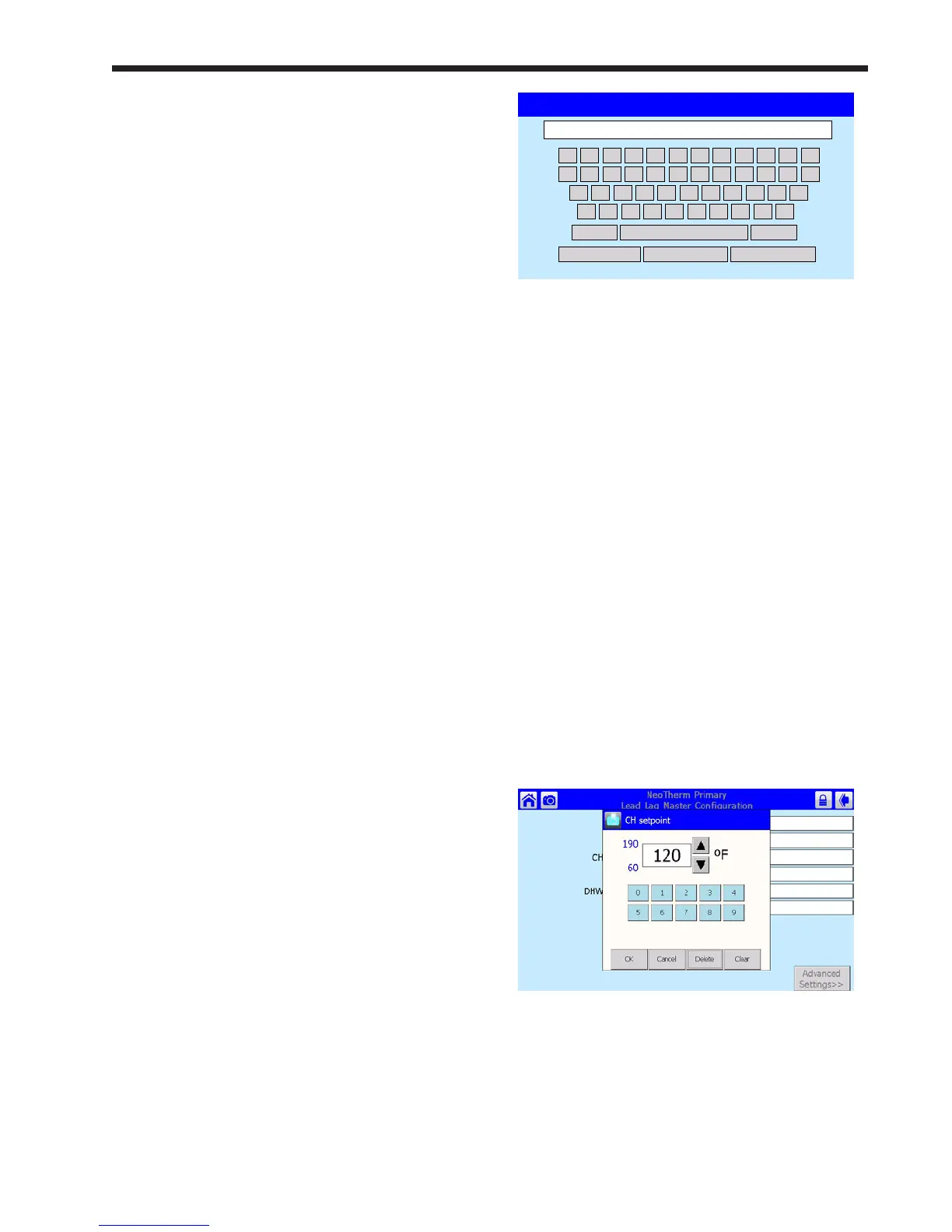
1 2 3 4 5 6 7 8 9 0 - =
q w e r t y i o p [ ]u
a s d f g h j k l : *
z x c v b n m , . /
Shift Backspace
OK Clear Cancel
Fig. 26 - Keyboard Screen
The passwords used by this system are “case
sensitive” – it matters whether a letter in the
password is capitalized or not. Pressing the Shift
key changes all of the keys to produce capital letters.
Press Shift again to go back to lower-case letters.
“BS” stands for “Back Space,” and also works as a
Delete key.
It may be difcult for some operators to press the
small keys on this screen. In this case, use the back
of a plastic pen, or the eraser section at the back of
a pencil. (Do not use sharp metal tools – these will
scratch the plastic surface of the screen.) You can
also tap a key with the tip of your nger, using the
ngernail. Each time you press a key, the system
will respond with a beep. If you are entering a
password, an asterisk (*) will appear for each
character you enter. The beeps and asterisks will
help you to enter the correct number of characters
for your password.
The process would be the same if you wanted to
change a numerical value, except that system would
present a numeric entry screen. See Fig. 27.
Fig. 27 - Numeric Entry Screen
Anyone can view all of the parameters. However,
to change most of the parameters, you will need a
password.
Home Upper
left-hand
corner
Return to Home page
Bell Upper
left-hand
corner
System in Lockout,
Reset required
Padlock Upper
right-hand
corner
Shows whether a
password has been
entered so parameters
can be changed
Back Upper
right-hand
corner
Return to previous screen
Sometimes a screen is used to present a list, and
often the list is too long to present on a single screen
view. To see the rest of the list, pull down on the
bar on the right side of the screen, or use the up- and
down-arrows.
To make a change, or to get more information about
one of the items on the list, press on the line for that
item.
If you are installing the system you will nd many
situations where you will need to enter a name or
password. The control system includes three levels
of password protection:
OEM Password Setup and parameter changes
made at the factory.
Installer Password Setup and parameter changes
made when the system is
installed, and some diagnostic
and troubleshooting functions.
The installer level password is
“lnt” (lower case “LNT.”)
User Level Non-critical adjustments and
functions, including adjusting
the Central Heat and Domestic
Hot Water setpoints, monitoring
the input and output variables,
reading parameters from the
controller, and reading the error
log
(For some special safety-related functions, besides
entering the correct password, the system will
ask you to go through an additional “verication”
process. For more information, see the section on
“Conguration.”)
When a password is necessary, the system will
present the keyboard screen. See Fig. 26.



 To Next Page