NeoTherm LC Boilers and Water Heaters
Page 87
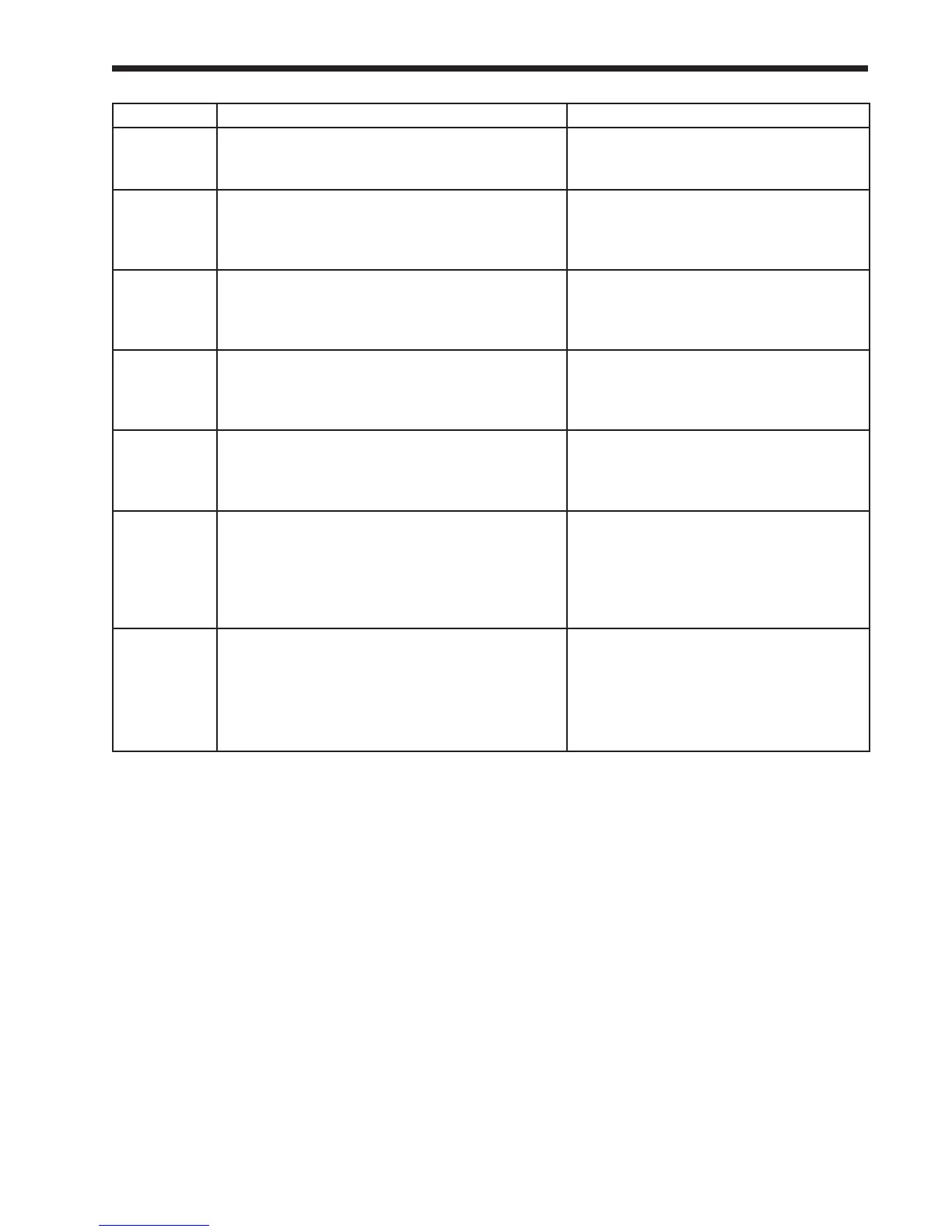
Label Description How to Reach
Modbus
address
Each controller must have a unique Modbus
address.
<’home’ screen> Setup button <Setup
screen> Control setup button/ Change
address button
Number of
controllers in
Flap Valve
system
Each controller needs to know how many ap
valves are included in the whole system. On a
system with 4 boilers, there would be a total of 8
ap valves.
<’home’ screen> Select a controller
<Status Summary screen> Congure
button <Conguration Menu> Select Flap
Valve Conguration
Outdoor
temperature
source
This congures which source is used to provide
outdoor temperature data: S5 sensor, S10 sensor,
Enviracom sensor, or Modbus communication”
<’home’ screen> Select a controller
<Status Summary screen> Congure
button <Conguration Menu> Select
Sensor Conguration
System
pump cycle
count
System pump cycle count. Can be written to
a new value (e.g. if the pump or controller is
replaced).
<’home’ screen> Select a controller
<Status Summary screen> Congure
button <Conguration Menu> Select
Statistics Conguration
Temperature
units
This parameter determines whether temperature
is represented in units of Fahrenheit or Celsius
degrees.
<’home’ screen> Select a controller
<Status Summary screen> Congure
button <Conguration Menu> Select
System Conguration
Lead/
Lag Warm
Weather
Shutdown
Enable
When the Lead/Lag system is enabled, and this
feature is enabled, this feature will turn off the
whole system (for Central Heating functions)
when the outdoor temperature is warm enough.
This prevents the system from running when
there is no need for heat.
If Lead/Lag enabled –
<’home’ screen> Lead/Lag Master button
<Lead/Lag Master screen> Congure
button <Lead/Lag Master Conguration
screen> Advanced Settings button/ Left-
or Right- arrow buttons
Warm
weather
shutdown
setpoint
If the outdoor temperature is higher than this,
the system will be shut off for Central Heating
functions.
If Lead/Lag enabled –
‘home’ screen/ View Lead/Lag button/
Lead/Lag screen/ Lead/Lag Master
button/ Lead/Lag Master screen/
Congure button/ Lead/Lag Master



 To Next Page