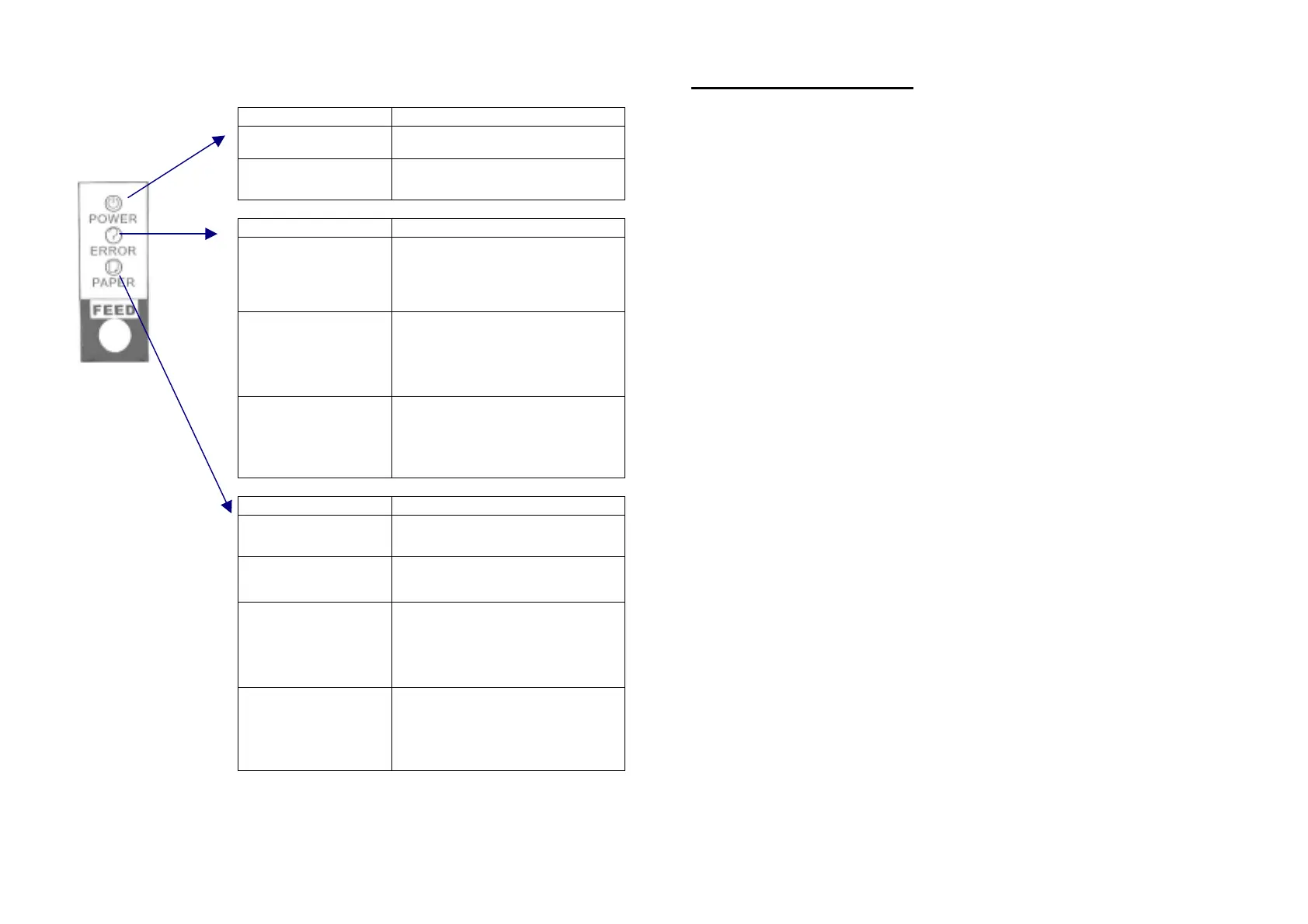
Indicator on Control Panel
Status Description
Power light “
On
”
Printer power is
on
.
Power light “
Off
”
Power cable is not connected with
printer
Status Description
ERROR light is “
On
”
(
not blinking
), and
heard beeper sound
Turn off the printer and check if
cutter was seized.
ERROR light is
”
Blinking
“
Make sure that the printer cover is
properly closed. Press the printer
cover audibly clicks into place.
ERROR light is
Off
,
but noting is printed
Try to run the self test to check that
the printer works properly. See the
self test instructions in Chapter 1.
Status Description
PAPER light is “
On
“
There is a paper roll inside the
printer.
PAPER “
Red
” light is
“
On”
The paper roll is near end.
PAPER “
Red
” light is
“
Blinking
“
The paper roll is not installed or is
at the end. Install a new paper
roll. See Chapter 1 for
instructions.
PAPER light is “
Off
“
If power is connected, and PAPER
light still Off, please turn off power,
and check if printer on
programming mode.
1-10
Chapter 2. The self test
The self test lets you know if your printer is operating properly. It checks
the control circuits, printer mechanisms, print quality, ROM version, and
DIP switch settings.
This test is independent of any other equipment or software.
Running the self test
1. Make sure the printer is turned off and the printer covers are closed
properly.
2. Make sure a paper roll has been installed properly.
3. While holding down the FEED button, turn on the printer using the
switch on the front of the printer to begin the self test. The self test prints
the printer settings, and then prints the following, cuts the paper, and
pauses.
If you want to continue SELF-TEST
Please press the FEED button
4. Press the FEED button to continue printing. The printer prints a
pattern using the built-in character set.
5. The self test automatically ends and cuts the paper after printing the
following.
***
completed
***
Please re-start to exit SELF-TEST
2-1


 To Next Page