11
AmpliFi User Guide Chapter 2: Devices
ULabs
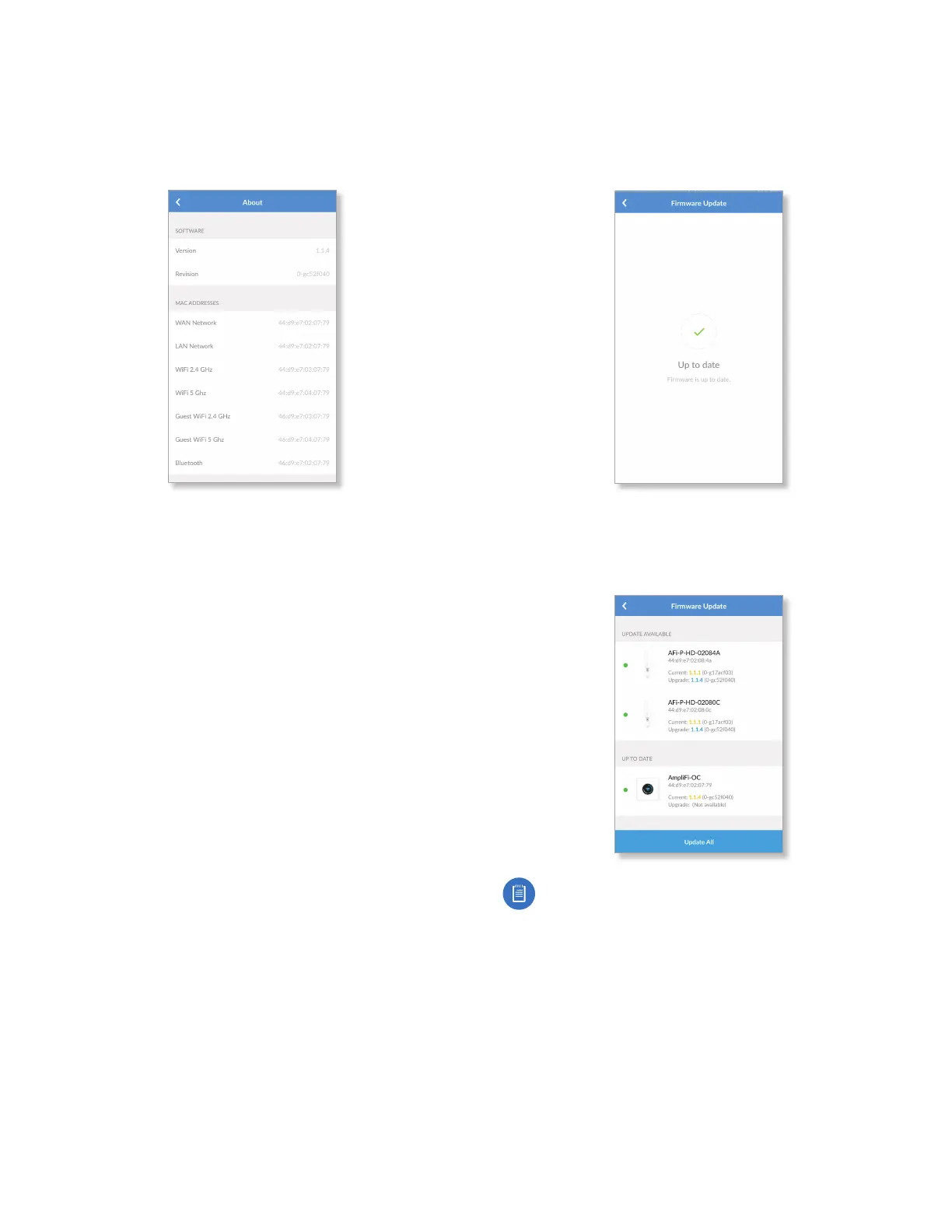
Software
• Version Displays the version number of the Router
software.
• Revision Displays the revision number of the Router
software.
MAC Addresses
• WAN Network Displays the MAC address of the WAN
(Internet or public) interface.
• LAN Network Displays the MAC address of the LAN
(local) interface.
• Wi-Fi 2.4 GHz Displays the MAC address of the 2.4 GHz
wireless interface.
• Wi-Fi 5 GHz Displays the MAC address of the 5GHz
wireless interface.
• Guest Wi-Fi 2.4 GHz Displays the MAC address of the
guest 2.4 GHz wireless interface.
• Guest Wi-Fi 5 GHz Displays the MAC address of the guest
5 GHz wireless interface.
• Bluetooth Displays the MAC address of the Bluetooth
interface.
Firmware Update
The Firmware Update screen allows you to check for updates
to the device firmware for the Router and Mesh Points.
• Up to date If there are no firmware updates available,
then “Up to date” is displayed.
• Updates Available If firmware updates are available,
then the current and update version numbers for the
firmware are listed for each applicable device. Tap Update
All to proceed with all available firmware updates.
Note: Your Wi-Fi will be temporarily down while you
update the AmpliFi devices. If you have significant
network activity, such as a download or upload in
progress, you can postpone the update until an
appropriate time.


 To Next Page