15
AmpliFi User Guide Chapter 4: Guest
ULabs
Chapter 4: Guest
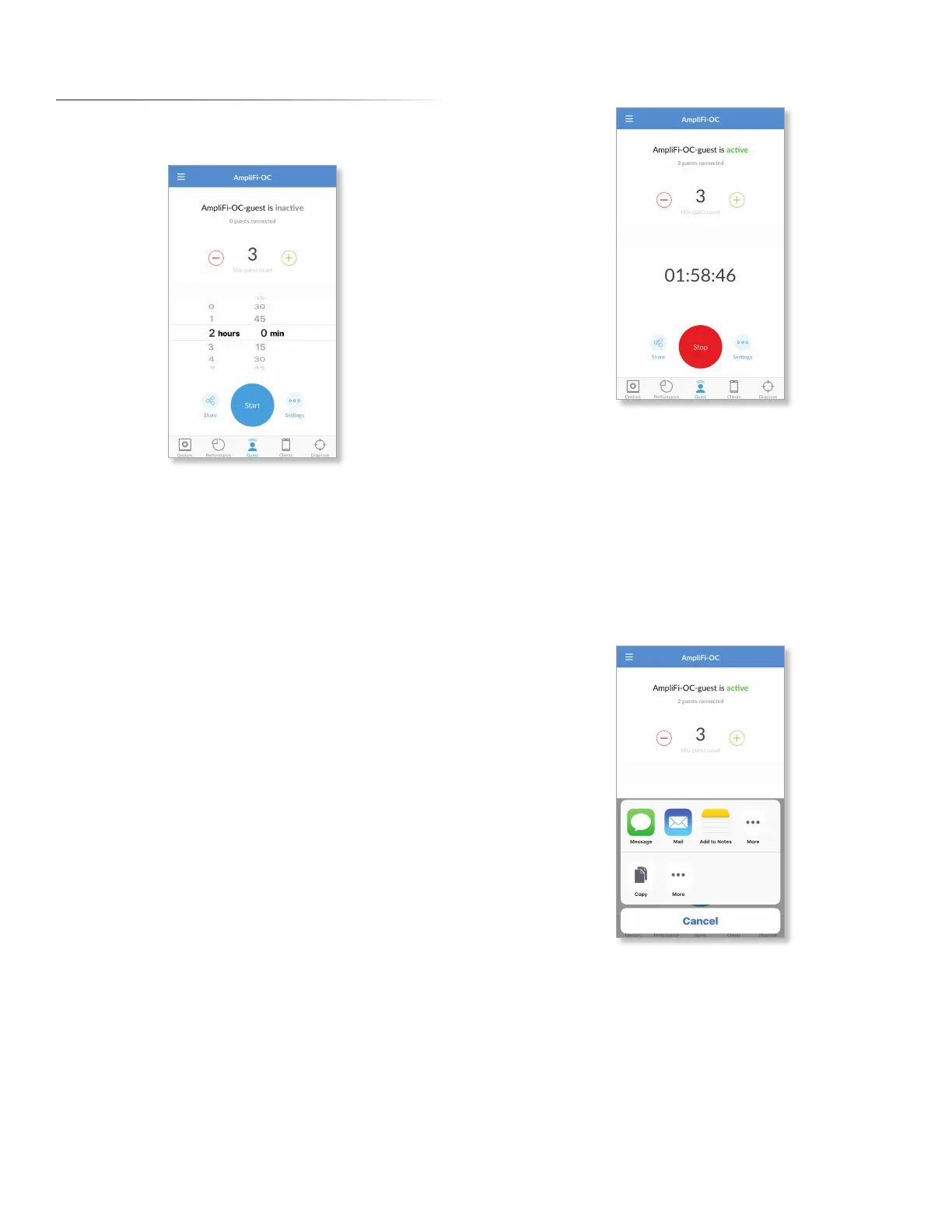
The Guest screen allows you to quickly enable a guest
wireless network for guest access.
Quick Setup
To enable the guest network:
1. Select how many guests, up to a maximum of 10, you
want to allow.
2. Set a time limit for how long you want them to have
access to it.
3. Tap Start. Your guest network is now active.
Guests simply connect to your wireless network named with
the -guest label. No password is required unless you enable
a guest password in the Wireless settings (tap Settings for
access).
As guests connect, the number of users connected will be
displayed in the app. Tap Stop at any time to turn off the
guest network.
Status and Settings
active/inactive Displays the status of the guest network.
(number of) guests connected Displays how many guests
are currently connected to the guest network.
Max. guest count Displays the maximum number of guests
allowed to connect at the same time.
(countdown) Displays the amount of time remaining
before the guest network is disabled. The countdown starts
as soon as you tap Start.
Share Tap to share the guest network name or SSID. Tap the
appropriate option, or tap Cancel to exit.
Start Tap to enable the guest network.


 To Next Page