19
AmpliFi User Guide Chapter 6: Diagnose
ULabs
Chapter 6: Diagnose
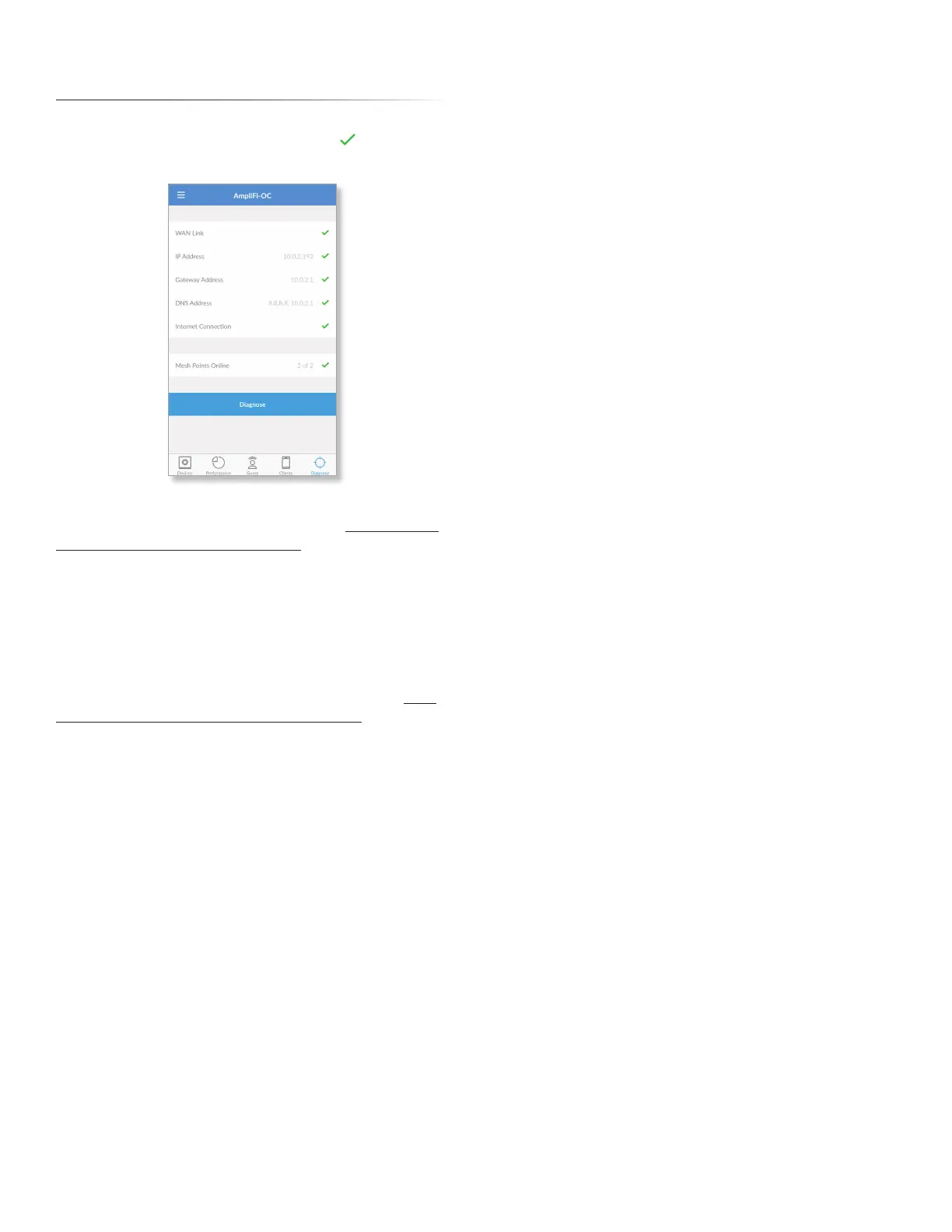
The Diagnose screen will check your WAN link, IP settings,
Internet connection, and Mesh Point status. indicates
success.
WAN Link The connection between the Router and modem
is checked. If there is an issue, please refer to “My Internet
is down; what do I do?” on page 22 for instructions.
IP Address Displays the public IP address of the Router.
Gateway Address Displays the IP address of the service
provider’s gateway router.
DNS Address Displays the IP address(es) of the service
provider’s DNS server(s).
Internet Connection The connection to the service
provider is checked. If there is an issue, please refer to “My
Internet is down; what do I do?” on page 22 for
instructions.
Mesh Points Online Displays the number of active Mesh
Points. If there is an issue, please ensure that each Mesh
Points is properly plugged into a power source.
Diagnose Tap to run the diagnostic checks again.


 To Next Page