How to clean and install the seal system
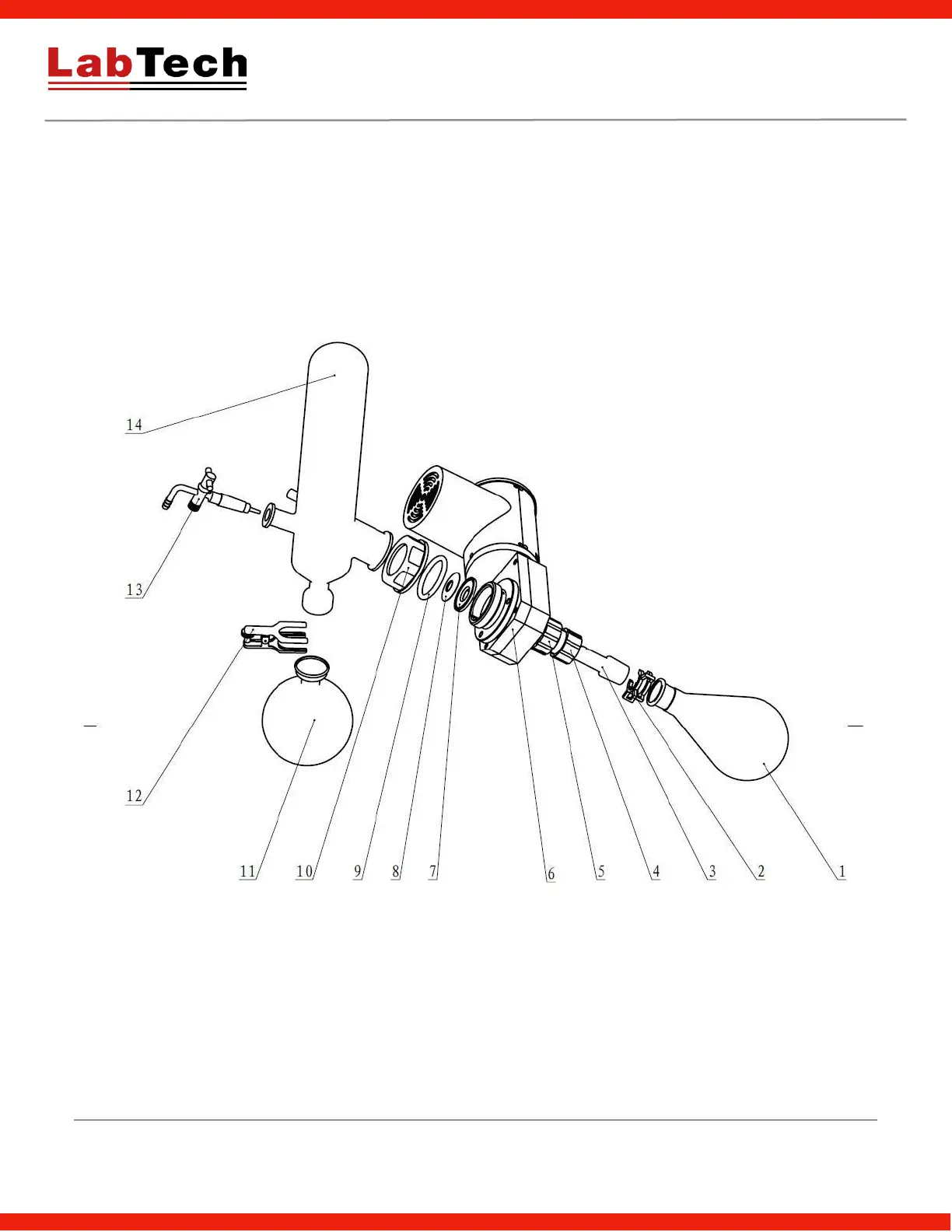
The picture below depicts the basic configuration of the seal system.
1. Shut off the power, remove the PTFE valve, the receiving flasks (#11) and the condenser (#14).
2. Rotate counter-clockwise the push-off nut (#4) to detach the evaporating flask (#1). Pull the glass axis (#3)
out. At the same time, get off the two seal rings (#7, #8) from the other end of the glass axis.
3. Clean involved components.
4. Reassemble the system according to the installation procedure.
1. Evaporation Flask 2. Clamp 3. Glass Axis 4. Push-off Nut 5. Locking Nut 6. Rotation part 7. Main Seal Ring 8.
Auxiliary Seal Ring 9. Spring 10. Condenser Lock Handwheel 11. Receiving Flask 12. Clamp 13. Sample Adding
Valve 14. Condenser


 To Next Page