24 Installation Manual 2014 - Riv 2
Setting the Timer Continued
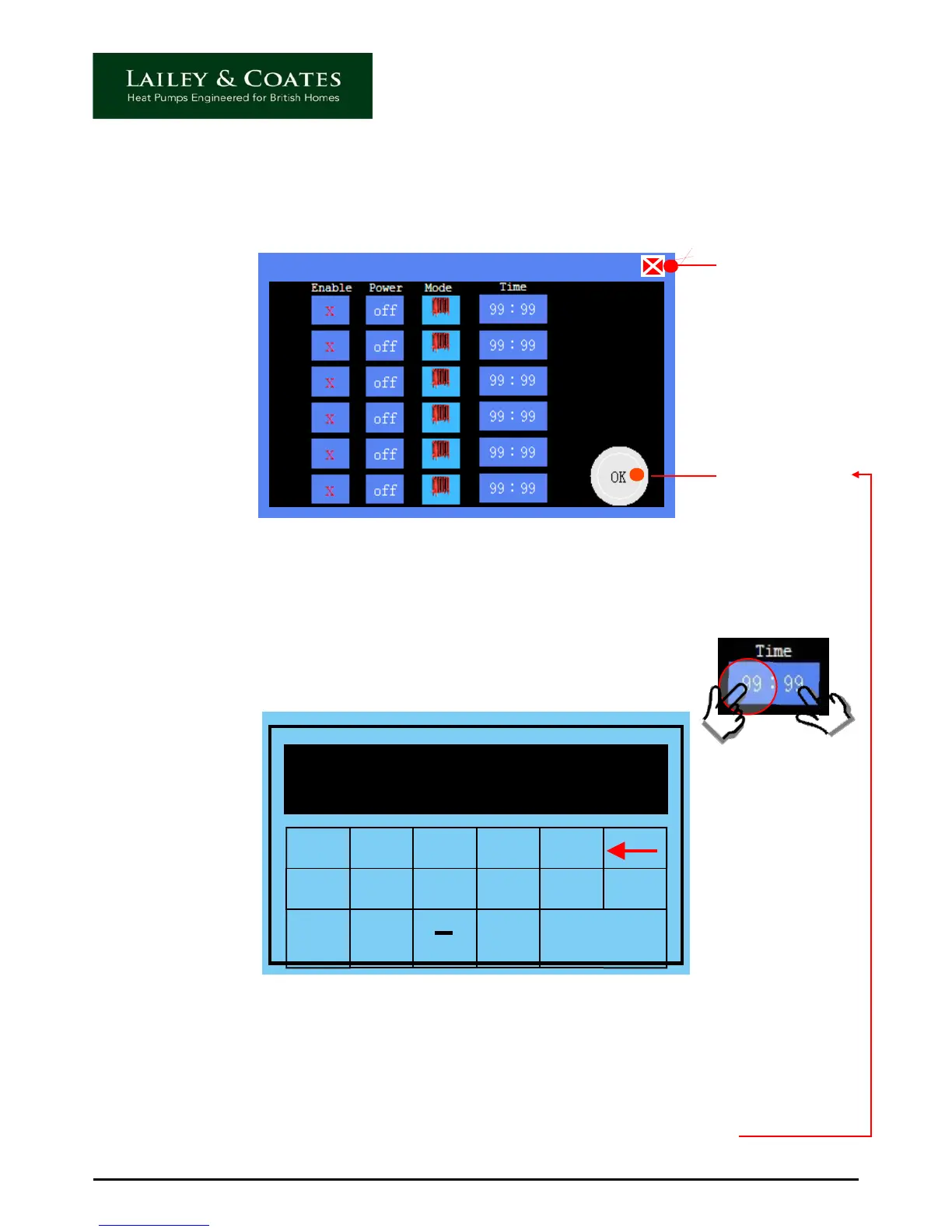
Individual day timer screen - Heating
IMPORTANT
Touch to accept
settings before
closing this
screen
Touch to close
the screen
Within the individual day timer screen there are three pairs of on/off timers. In other words
the system can be set to switch on and off three times during a 24 hour period. These can
be set as follows:
1) Touch the hour side (left) of the relevant time indicator, this will allow
adjustment of the hour by taking you to the following screen.
1 2 3 4 5
6 7 8 9 0 Clr
oo
Esc Enter
16
Using the 24 hour format enter the required hour. For example 16 for 4pm, the
corresponding digits will appear, touch enter to accept. To adjust the minutes, repeat the
process by touching the minute side (right), entering the minutes and touching enter.
The correct time should then be displayed in set timer screen, touch the OK icon to confirm
and accept the setting.
NOTE: If you close the screen without touching OK your setting will be lost.
Continued…


 To Next Page