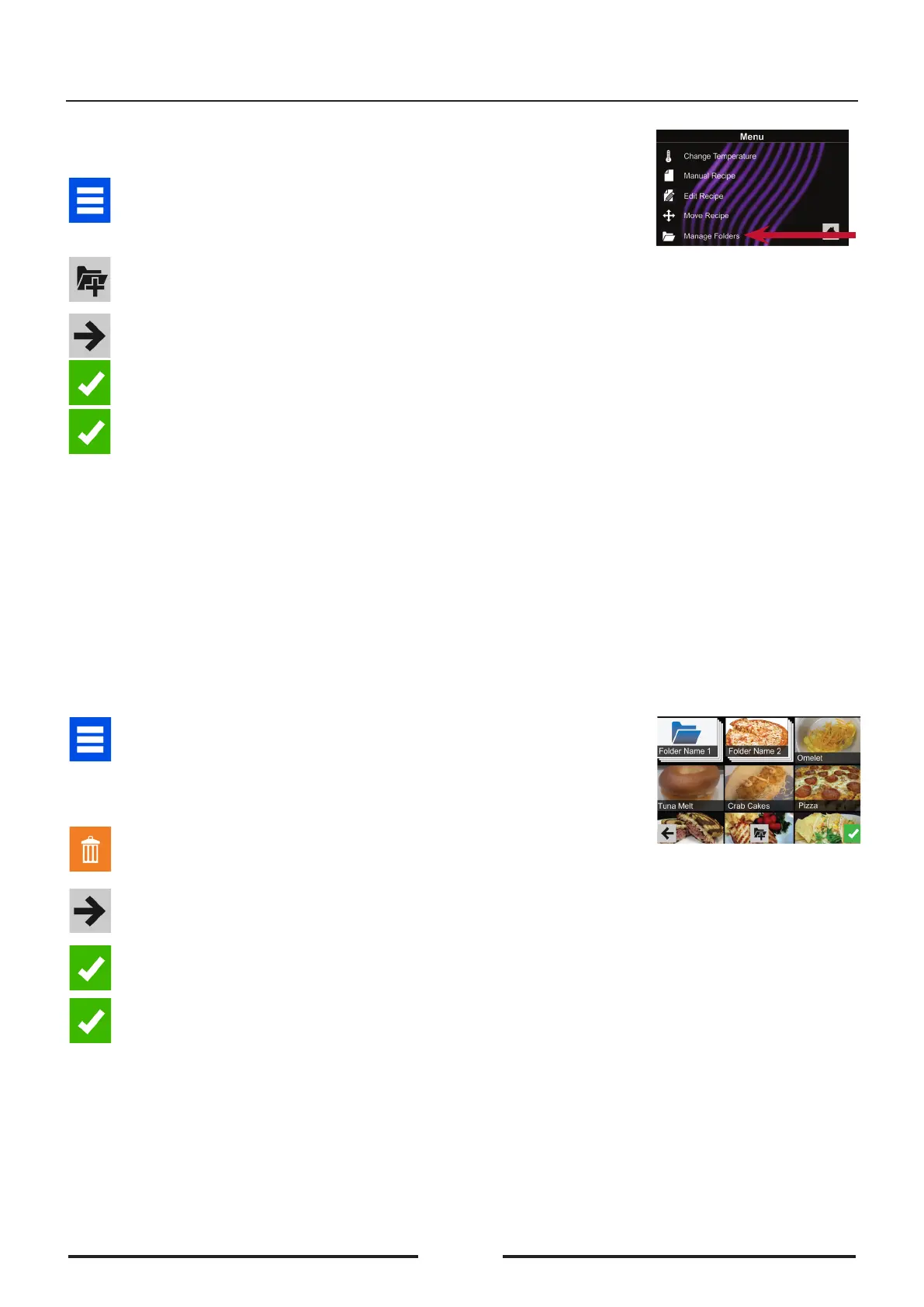
Manually create a recipe folder:
1� Touch the blue menu icon at the bottom of the screen.
2� Touch the “Manage Folders” option in the menu screen
3. Touch the desired folder to be edited.
To delete the folder: Touch the orange recycle bin icon.
Touch the check mark to conrm deletion. Or, touch the “X” to dismiss.
4� If desired, select a dierent photo, icon, or colour for the folder.
Touch the right arrow icon to move to the next screen.
5� If desired, change the name of the recipe.
Touch green check mark to save changes.
6� Touch the green check mark icon once more to save the revised
folder.
Manual Organization: Folders
Manually create a recipe folder:
1� Touch the blue menu icon at the bottom of the screen.
2� Touch the “Manage Folders” option in the menu screen.
3. To create new folder, touch the grey folder icon at the bottom of
screen.
4� Choose a background colour and icon, or an image to customize the
folder. Touch the right arrow icon.
5� Name folder and touch the green check mark to save.
6� Conrm that your new folder appears on the main screen. Touch the
green check mark icon again to save the new folder.
2
22
90035620rev01





 To Next Page