Multimedia system
Multimedia System Control Logic
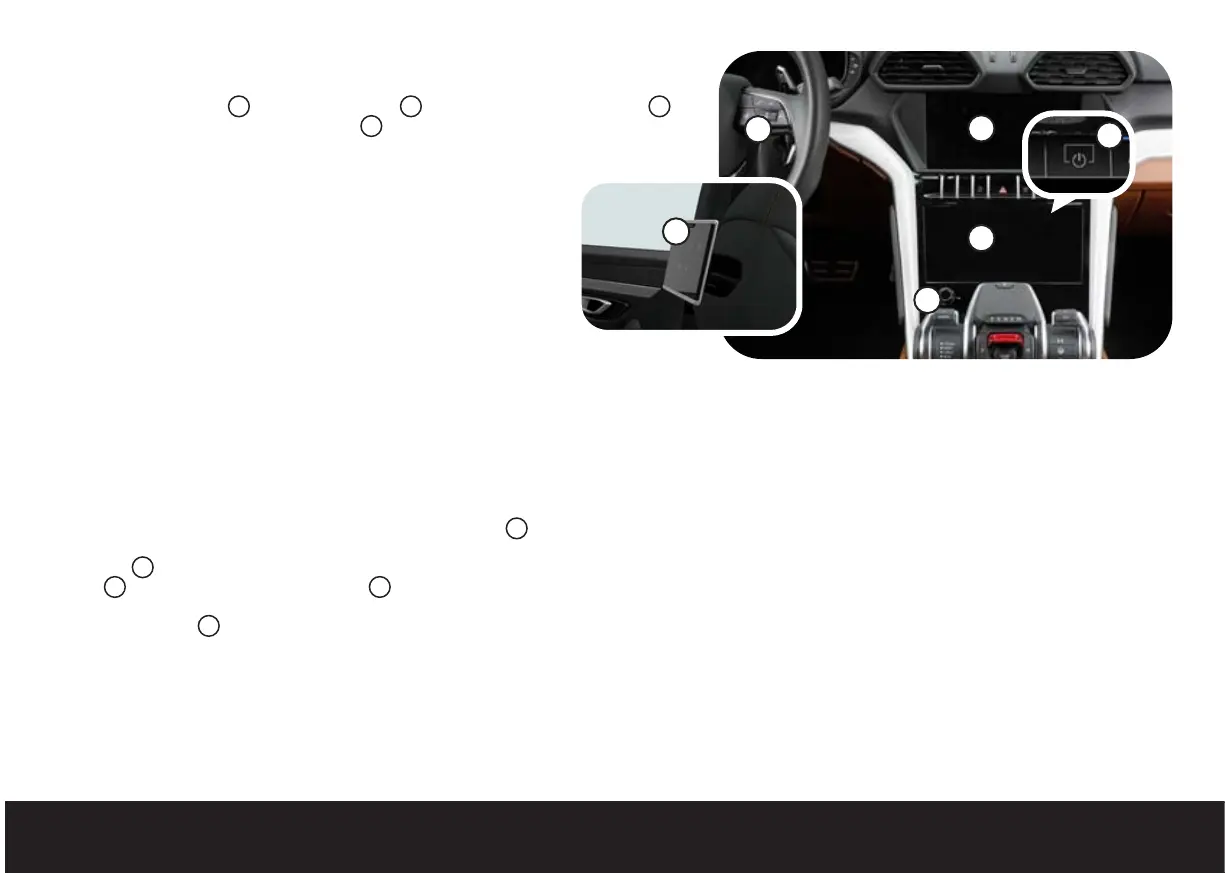
The upper control panel
1
, lower control panel
2
, buttons on the steering wheel
3
and Lamborghini Rear Seat Entertainment
4
allow you to view and control various
functions of the vehicle and its infotainment system.
Setup Wizard
On first start-up, the setup wizard helps you set the vehicle functions,
such as the system language or connection to a telephone, for
example. To bring up the setup wizard at a later date, select the initial
screen then open the menu HELP > Setup wizard.
Usage Tips
On first start-up, tips for using various functions are displayed on the
upper control panel. To bring up usage tips at a later date, select the
initial screen then open the menu SETTINGS > Help > Display usage
tips.
Switching the Multimedia System On and Off
To switch off the multimedia system, press and hold the button
5
until the upper control panel switches off; to switch it back on, press
the button
5
. To switch off only the upper control panel, press the
button
6
; to reactivate it, press the button
6
again, or touch the
upper control panel. To switch both control panels off and on, press
and hold the button
6
.
Touchscreen Display
The touchscreen displays are controlled by pressing and moving a finger on
them, very much like using a smartphone.
• Press once to select a function.
• Press and hold an item to bring up options which are not currently displayed.
• Press and drag an item to move it.
• Place two fingers on the display and bring them together or move them
apart (pinch to zoom function) to zoom in or out of the item displayed.
• Place two fingers on the display and rotate them, inverting their position
without removing them from the display, to rotate the display.
• Place one finger on the display and slide it upwards or downwards to scroll
up and down through lists.
• Place one finger on the display and slide it to the right or left to scroll
between lists.
• Place a finger on a hidden menu and drag it to the centre of the display to
open the menu; perform the operation in reverse to close it.
• Place a finger on an item and drag it towards the right edge of the display
to close it.
1
2
3
4
6
5



 To Next Page