Driving
Parking Assistance
Depending on the vehicle's configuration, various parking and manoeuvring assistance systems may be installed.
1
Parking Sensors
The parking sensors provide audible feedback and a graphical display of the distance from obstacles.
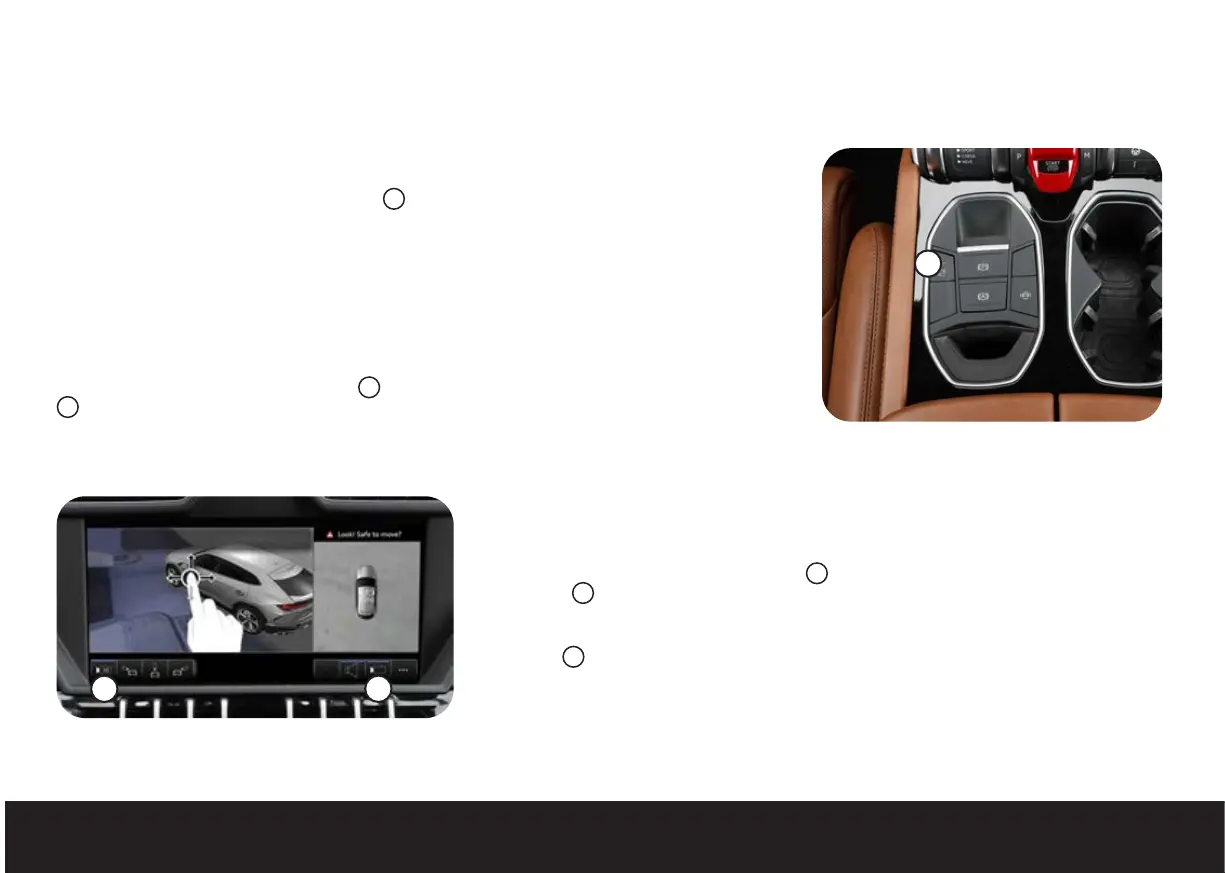
They can be activated by pressing the button
1
at speeds below 6 mph (10 km/h), engaging reverse
or approaching an obstacle at speeds below 6 mph (10 km/h). They can be deactivated by pressing the
button again, or by driving forward at a speed of above 6 mph (10 km/h).
Rear-View Camera
The rear-view camera displays the area behind the vehicle and reference lines for the manoeuvring
trajectory while parking.
It can be activated by pressing the button
1
at speeds below 6 mph (10 km/h), by pressing the button
2
when the parking sensors are already active, or by engaging reverse. It can be deactivated by
pressing one of the buttons again, or by driving forward at a speed of above 6 mph (10 km/h).
Surround View Cameras
The surround view cameras are an extension of the rear-view camera and help the driver
during parking and manoeuvring by showing different views around the vehicle.
They can be activated by pressing the button
1
at speeds below 19 mph (30 km/h), by
pressing the
2
button when the parking sensors are already active, or by engaging reverse.
They can be deactivated by pressing one of the buttons again, or by driving forward at a speed
of above 6 mph (10 km/h) or 19 mph (30 km/h), depending on how they were activated.
The button
3
switches between 2D and 3D views of the vehicle and surrounding area, while
the buttons to the side choose between the available views. Place a finger on the upper control
panel and drag to navigate around the vehicle.
23


 To Next Page