9
Exclusive to Howdens
1011102 1
3 4 5 6 987
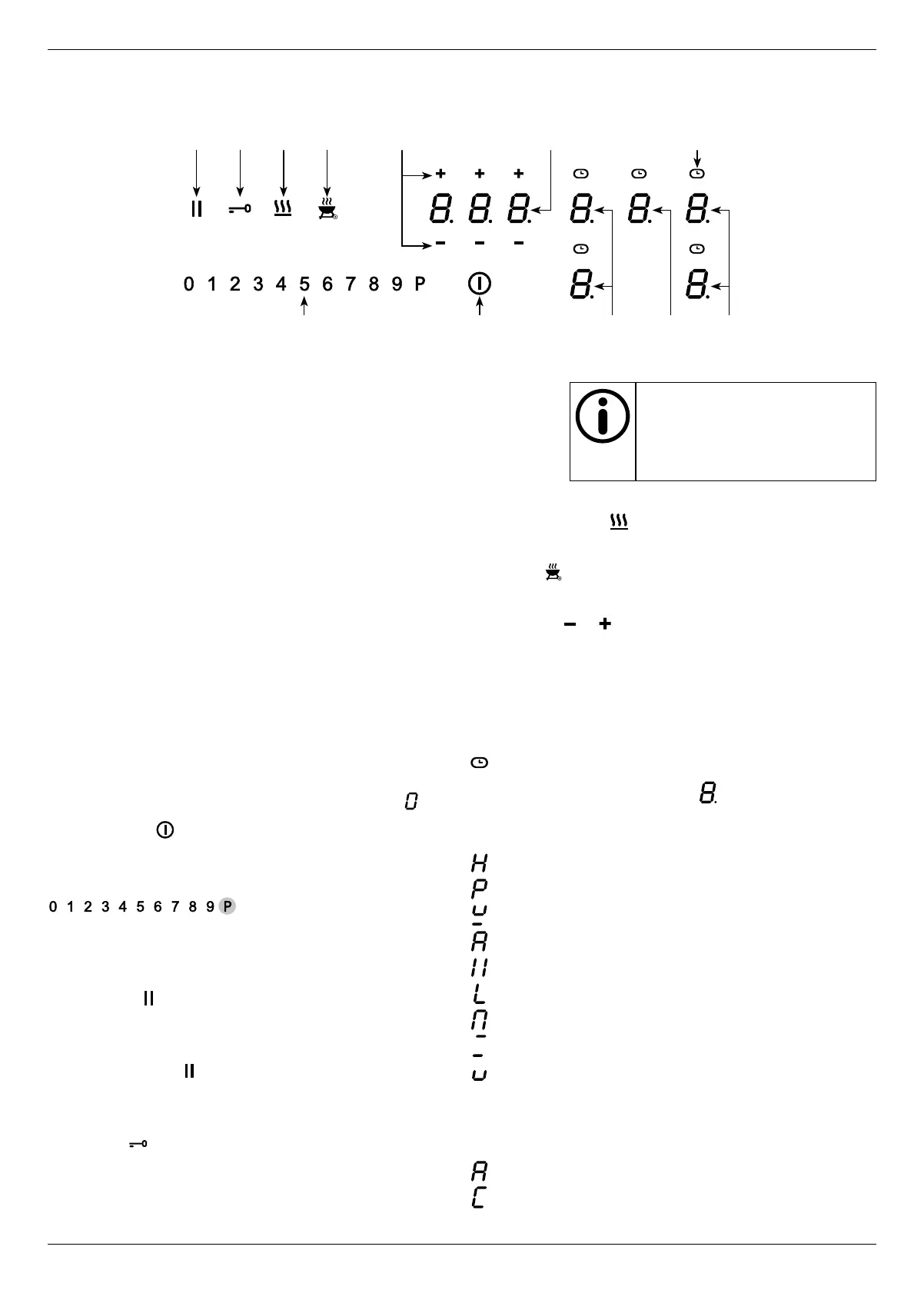
2. Controls overview
1. ON/OFF key
2. Sensor eld
3. Pause key
4. Lock key
5. Warming key
6. Grill key
7. Minus key / Plus key - timer
8. Timer indication
9. Display cooking zone timer
10. Hob power setting
11. Fan power setting
The glass hob is operated with touch control
sensor keys. The sensor keys are operated as
follows: lightly touch a symbol on the surface of
the ceramic glass plate. A buzzer will indicate
when the controls have been operated
cor rectly.
The touch control sensor key will then be
indicated as ‘key’.
Permanent pan recognition
If the hob has permanent pan recognition, a
cooking setting can only be switched ON via
the sensor eld after a pan has been detected
on the hob and the power display shows
.
ON/OFF key
(1)
This key is used to switch the hob ON/OFF.
Powerboostinthesensoreld
(2)
The power boost setting makes additional
power available for induction cooking zones or
fan.
Pause key
(3)
The pause function can be used to briey stop
the cooking process.
Recall function
(3)
The most recent setting can be recovered if
the hob is switched OFF unintentionally.
Lock key
(4)
The lock key can be used to lock all of the keys.
Keep warm key
(5)
To keep warm.
Grill key
(6)
Grill function with a griddle plate for induction.
Minus key
/ Plus key (7)
These keys are used to set the timer and the
automatic switch-off function of the cooking
zones as well as the automatic delay stop of
the fan.
Symbols (9)
Timer function, automatic switch-off device.
Hob power setting display
(10)
The hob power setting indicator shows the hob
power setting which has been selected, or:
Residual heat
Power boost
Pan recognition
Automatic boost function
Pause function
Childproof lock
Bridging function
Grill function
Keep-warm function
Fan power setting display (11)
The power setting indicator shows the hob
power setting which has been selected, or:
Automatic function
Replacing the carbon lter
Most of the keys shown
here will only become
visible when the hob has
been switched ON.



 To Next Page