LANCOM 821+ – LANCOM 1711+ VPN – LANCOM 1721 VPN
Chapter 5: Linking two networks
47
EN
5.3 1-Click-VPN for networks (site-to-site)
The site-to-site coupling of networks is now very simple with the help of the
1-Click-VPN wizard. It is even possible to simultaneously couple multiple
routers to a central network.
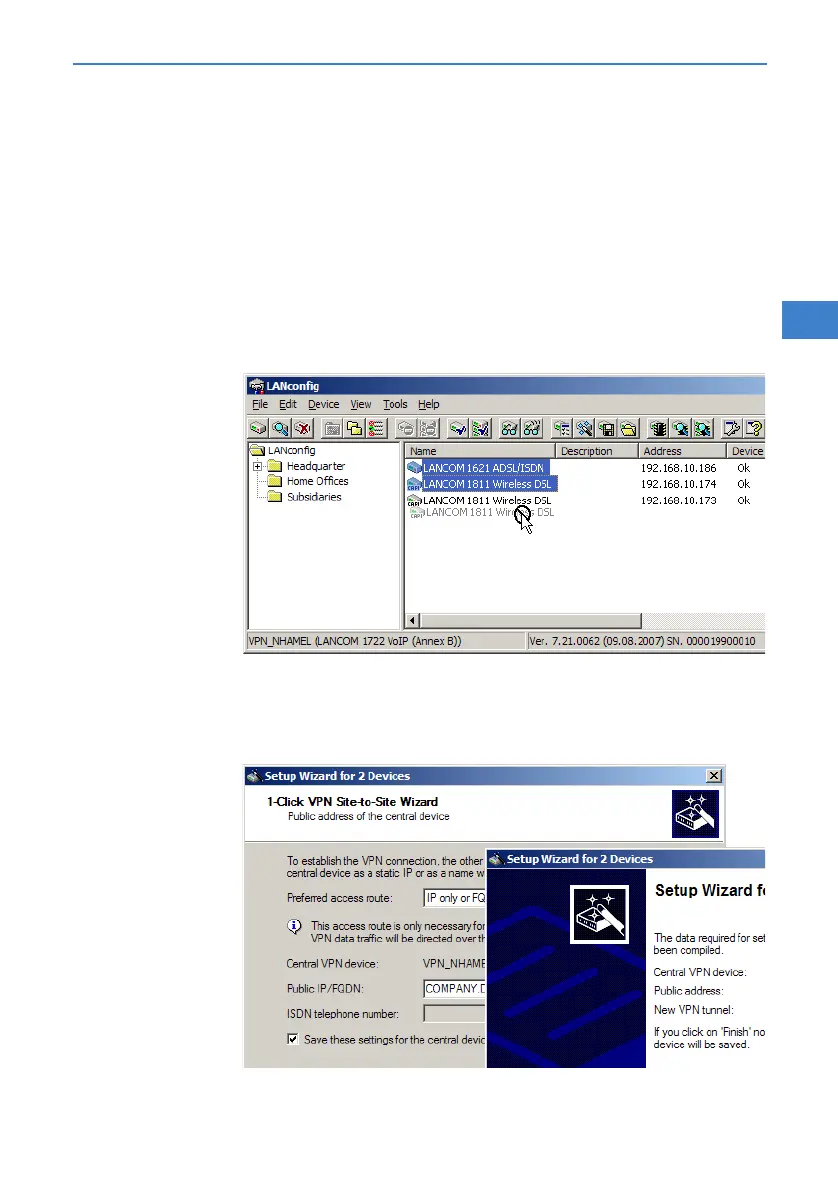
In LANconfig, mark the routers at branch offices which are to be coupled
to a central router via VPN.
Use drag&drop by mouse to place the devices onto the entry for the
central router.
The 1-Click-VPN Site-to-Site Wizard will be started. Enter a name for this
access and select the address under which the router is accessible from
the Internet.



 To Next Page