ThisdocumentisthepropertyofLANDI.
Itscontentcannotbereproducedordivulgedwithout
the company’swrittenapproval.
11/18
*****************************************************************************************
WARNING
Don’t connect the port by mistake, because any act of error may cause a failure of the terminals.
*****************************************************************************************
3 Product Installation Guide
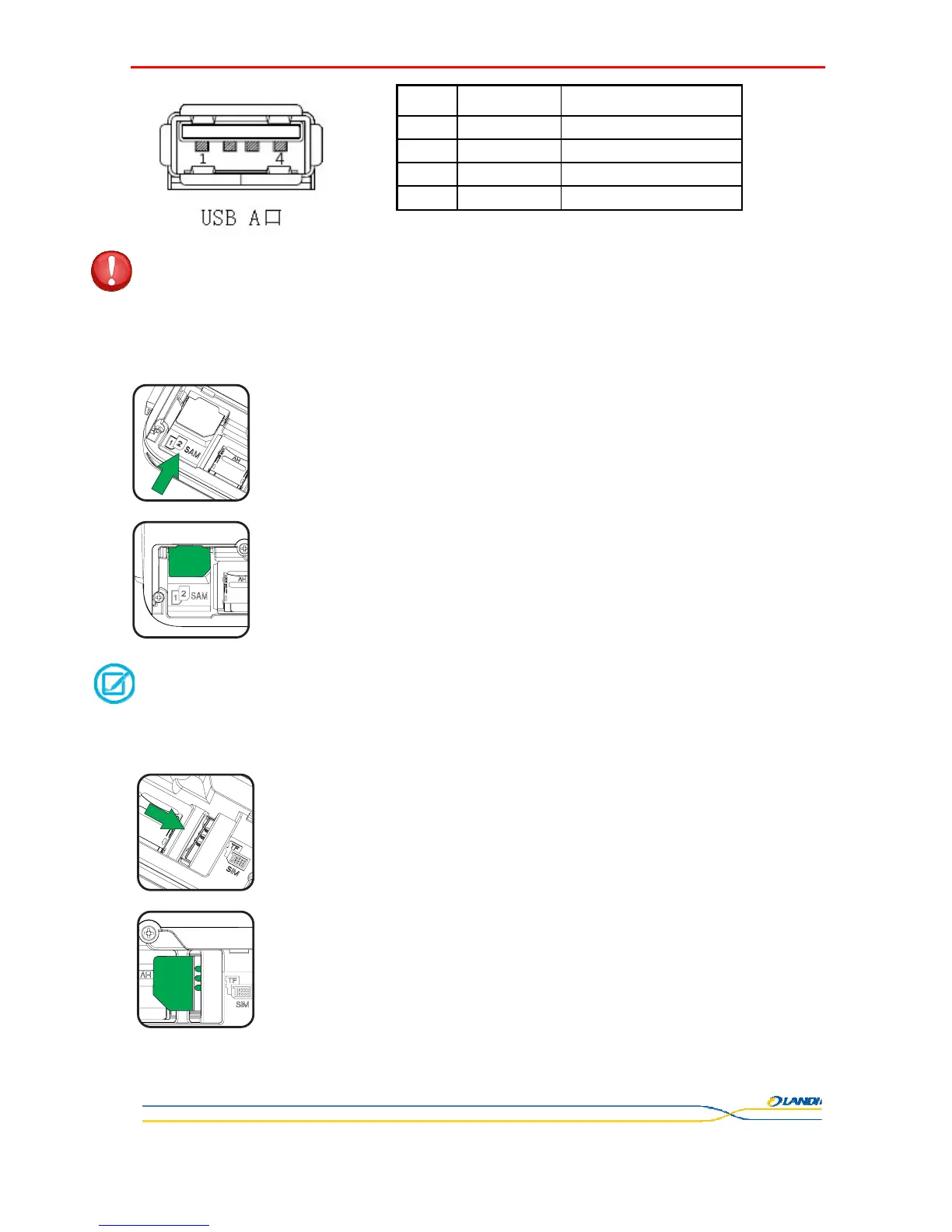
3.1 SAM Card Installation
Insert SAM card:
Insert the SAM card gently following arrow direction, until it is completely embedded.
The POS terminal is designed with two SAM slots.
Remove the SAM card:
Press the top of the SAM cards and pull it out slowly.
******************************************************************************************
NOTE
When using only one SAM card, it is recommended to insert SAM1 slot (bottom).
******************************************************************************************
3.2 SIM Card Installation
Same procedures as above Chapter 3.1
SN SIGNAL Function description
1 VBUS
USB Power port5.0V
2 D- Data line, differential signal-
3 D+ Data line, differential signal+
4 GND GND



 To Next Page