ThisdocumentisthepropertyofLANDI.
Itscontentcannotbereproducedordivulgedwithout
the company’swrittenapproval.
13/18
4 Product Instructions
4.1 Usage of Keys
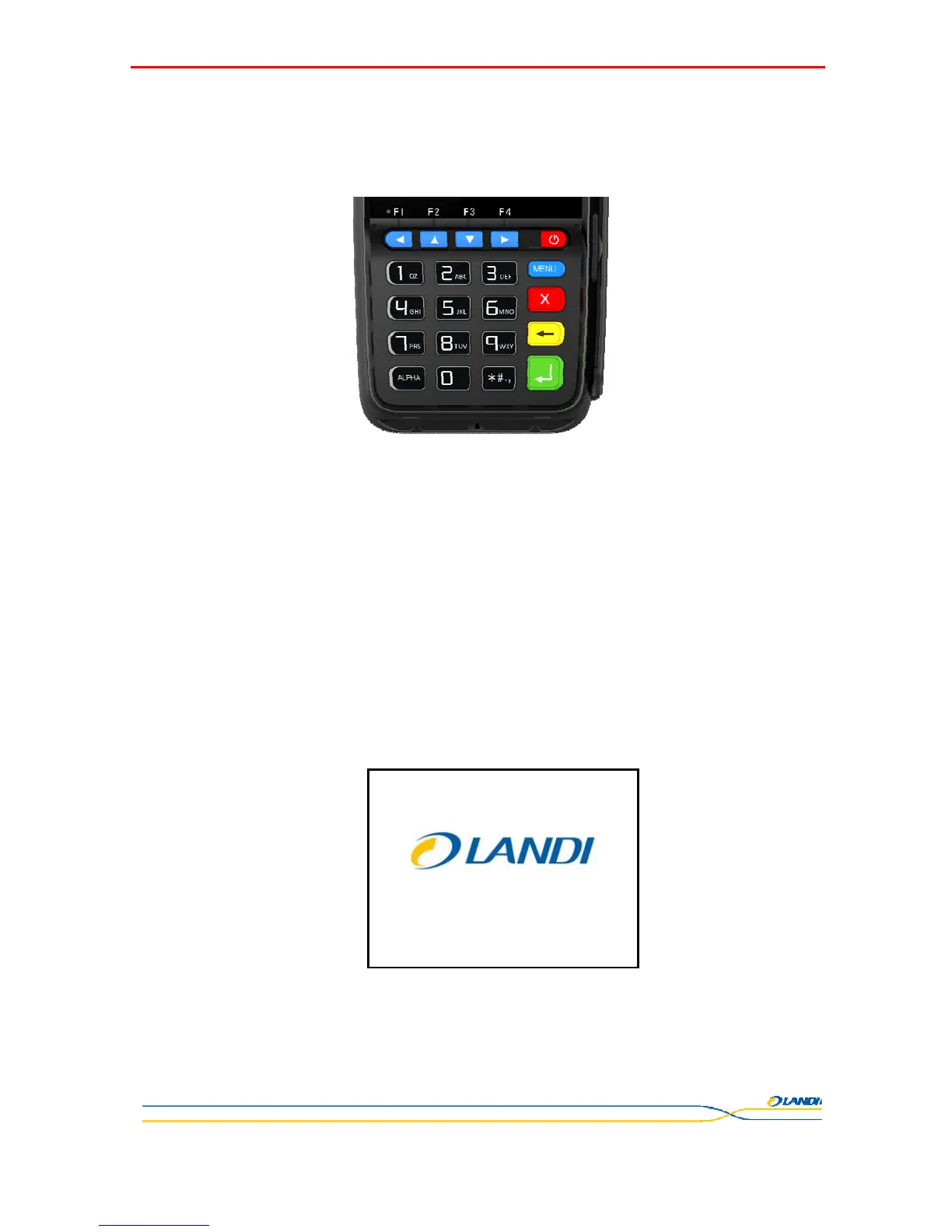
There are 21 keys in total on device keyboard. Key functions described as follows:
F1/: Key reserved for future use/ left arrow key
F2/: Key reserved for future use/ up arrow key
F3/: Key reserved for future use/ down arrow key
F4/: Key reserved for future use/ right arrow key
Menu: Function Key, can be used alone or with other keys, depending on customer needs.
Power: Power button, for switching power or screen display. Details refer to "Switch Operation"
instruction.
Cancel: Cancel button. Press this button to cancel the current operation or return to the parent
menu.
Clear: Clear button., to delete the latest input.
Enter: Enter button to confirm current operation.
0~9 : Numeric button, to input number from 0 to 9.
Letter: Used for alphanumeric switching.
Character (* #.): Switch character
4.2 Power on/off Operation
Normal power on: Press <Power> button for about 1s until the terminal displays the figure below:
Normal power off: Press <Power> button for 2s until the terminal displays the figure below:



 To Next Page