ThisdocumentisthepropertyofLANDI.
Itscontentcannotbereproducedordivulgedwithout
the company’swrittenapproval.
12/18
******************************************************************************************
NOTE
The appearance of the sockets of SIM card and SAM is same. Please do pay attention to the SIM card
socket position and refer to the installation method as per SAM card.
******************************************************************************************
3.3 MicroSD Card Installation
MicroSD Card Installation
Push the cover backwards and open it. Insert MicroSD card and then close the cover and pull forwards.
Remove MicroSD card
Removal steps are following with the installation procedure, only the third step goes Remove MicroSD
card.
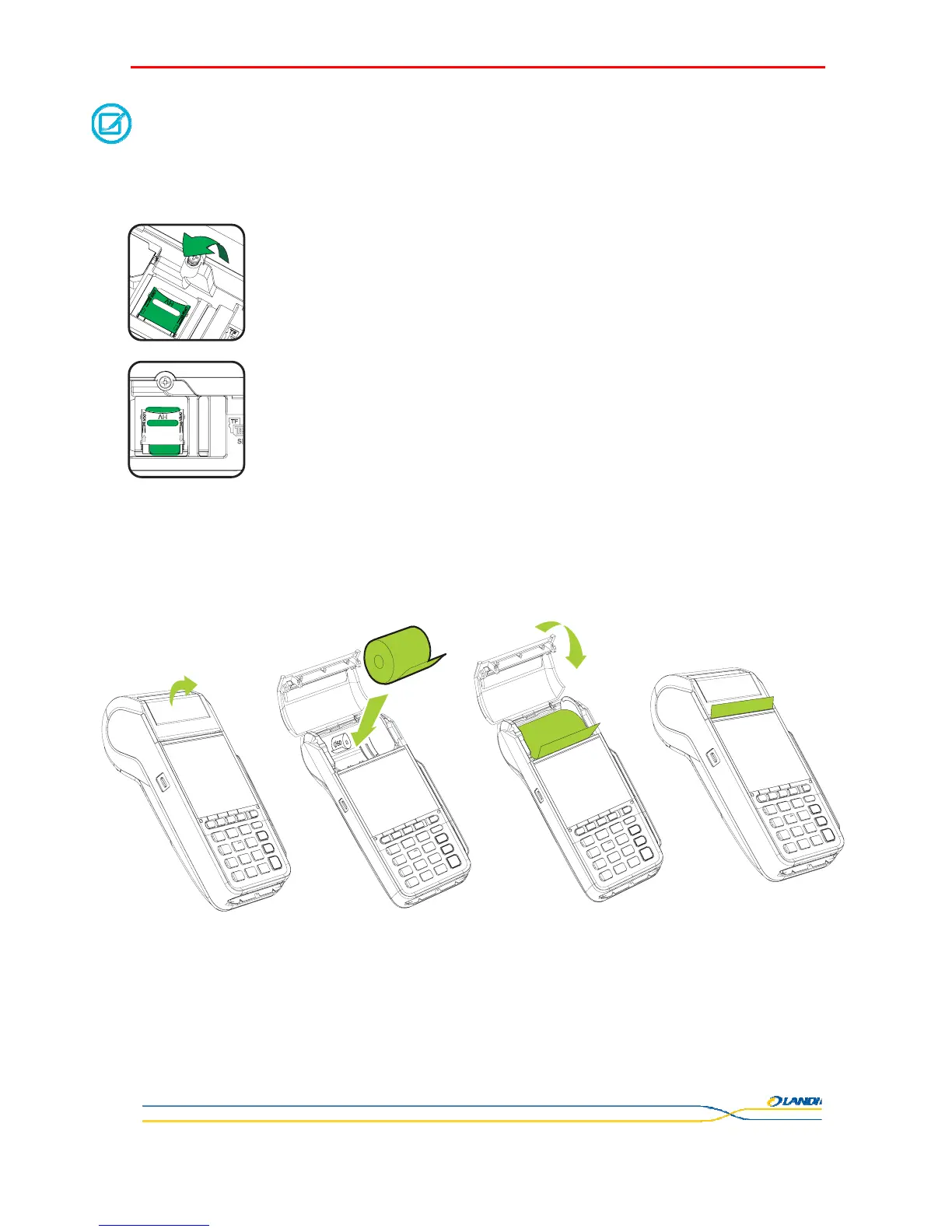
3.4 Installation of Print Paper
z Open the printer cover on the top of POS terminal.
z Place the paper roll onto paper box and pull out the paper over the ripper.
z Close the printer cover. Please be noted that the carbon layer side of the printer paper should be faced against the the cover.
z Leave a section of paper out after closing the cover.


 To Next Page