NCA-5710 User Manual
41
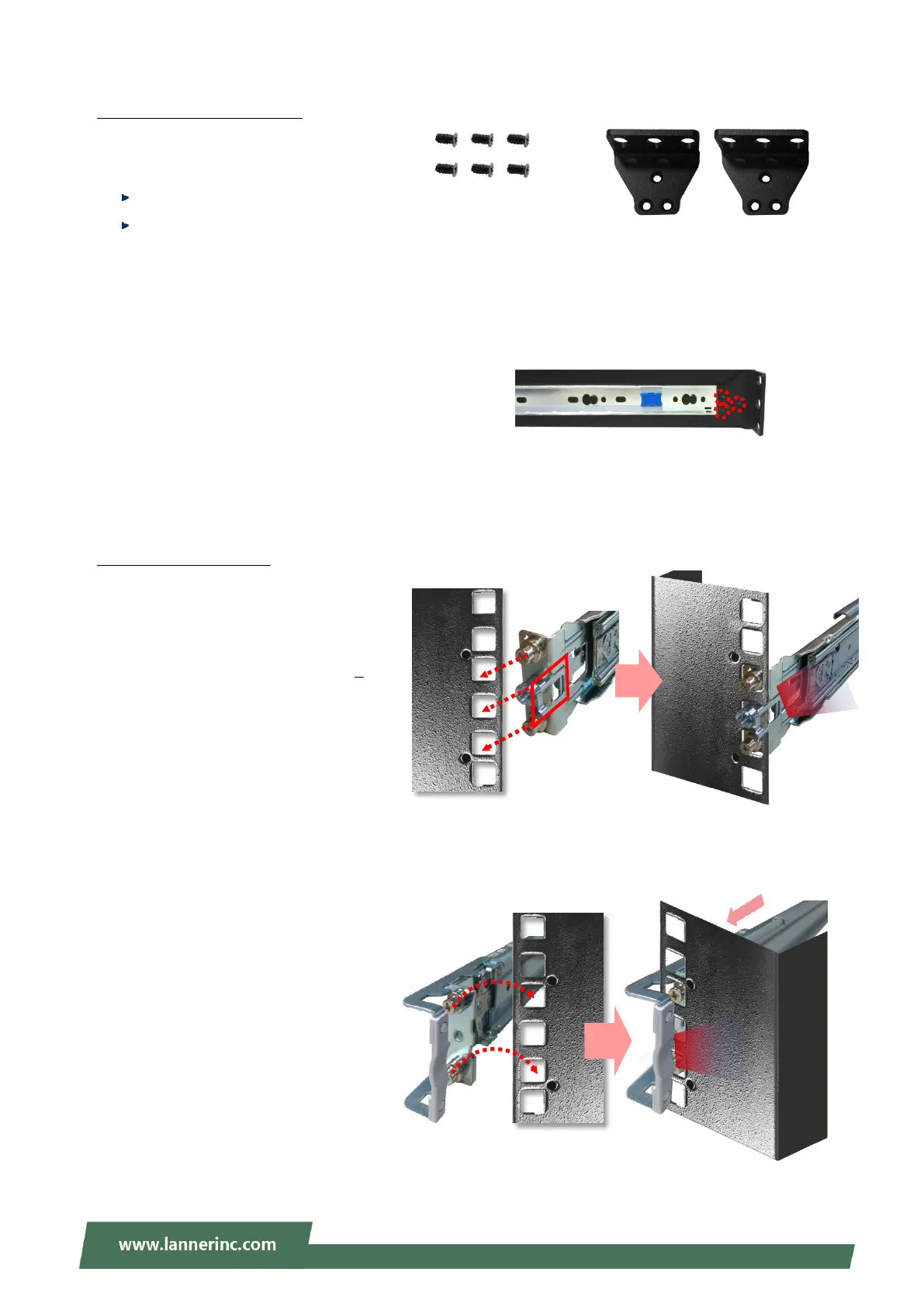
Assembling the Ear Brackets
1. Check the package contents, which
shall include the items below:
1x pack of screws
2x Ear Brackets
2. Install the Ear Brackets on both
sides of the system using the
provided screws.
Installing the Slide Rails
Now, you shall install the slide rail
assemblies onto the rack.
1. This slide-rail kit does NOT require
screw-fixing. Simply aim at 3
available screw holes on the rack
front and snap the rail front into
the rack post as shown in the
image. You should hear a “click”
sound once it is firmly attached.
2. For the rear rack installation, slide
the rail to aim and engage the
bolts on the rail’s rear end with the
2 available holes on the post, and
the rail assembly will click into
place.
For securing the Ear
Brackets on the unit
Use this clamp
to fix the front
end of the rail
onto the post.



 To Next Page