14
2.
Ptay radio
Alter enter
rad~
fund~n
mode.
the
system will automatically
p~y
the
radio station
e~isted
tast
~me
.
Or
louchlhe
screen
tighUy
to setect prestore slabon
10
ptay. The
operat~ns
are shown
as
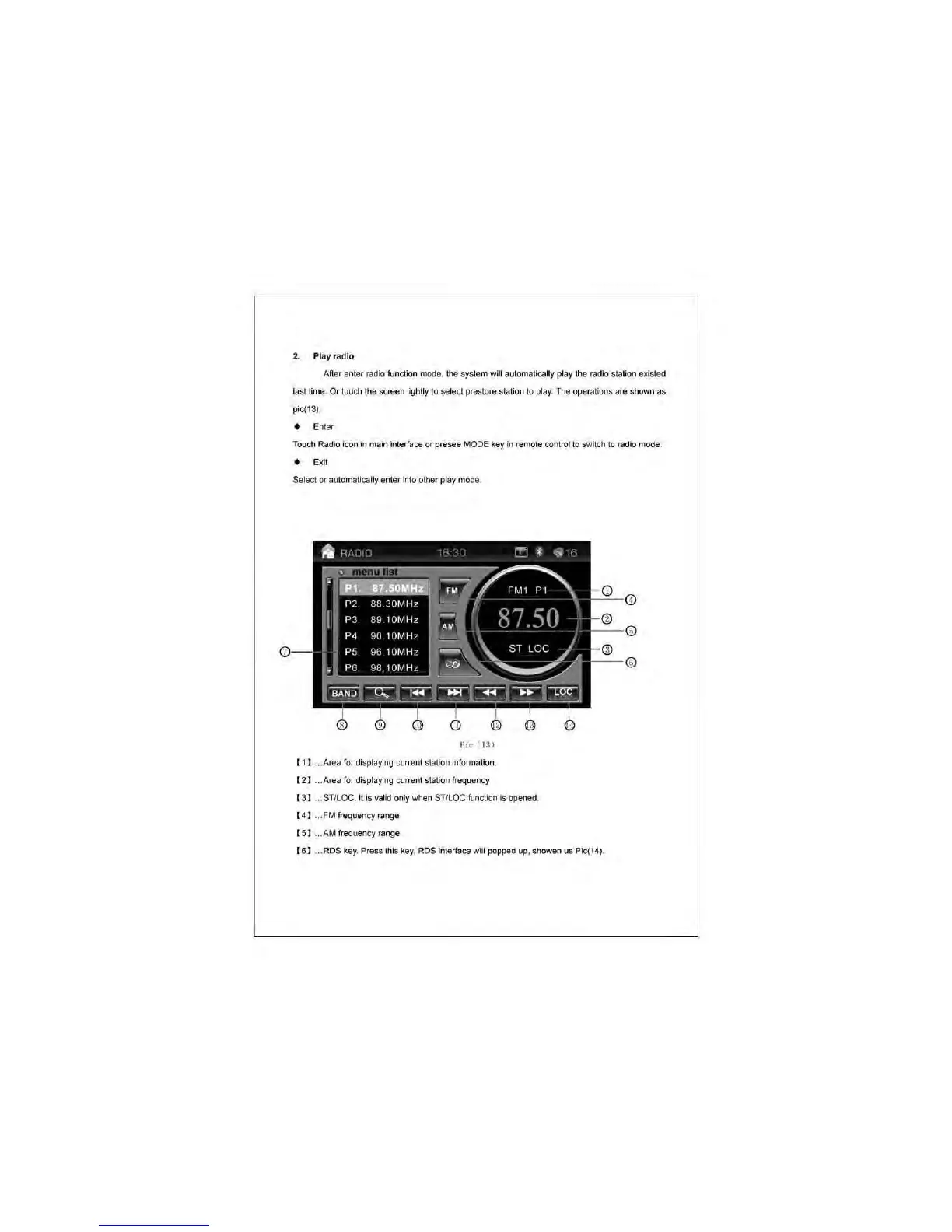
pic(13).
• Enter
Touch Radio i
con
in
main interface
Of
presee MODE
key
in
remole control
to
switch
to
radio mode .
• Exit
Seled
or
automatically enter into other play mode.
"
Pic
(3)
( 1] ... Area for displaying current
sta~on
informa~on
.
( 2] ... Area for displaying current station frequer.cy
( 3] ... STILDC. It is
va
l
id
only when STILDC function
is
opened.
( 4 ] ... FM frequency range
( 5] ... AM frequency range
( 6 ] ...
ROS
key. Press this key.
ROS
interface will popped
up
. showen us Pic(14).



 To Next Page