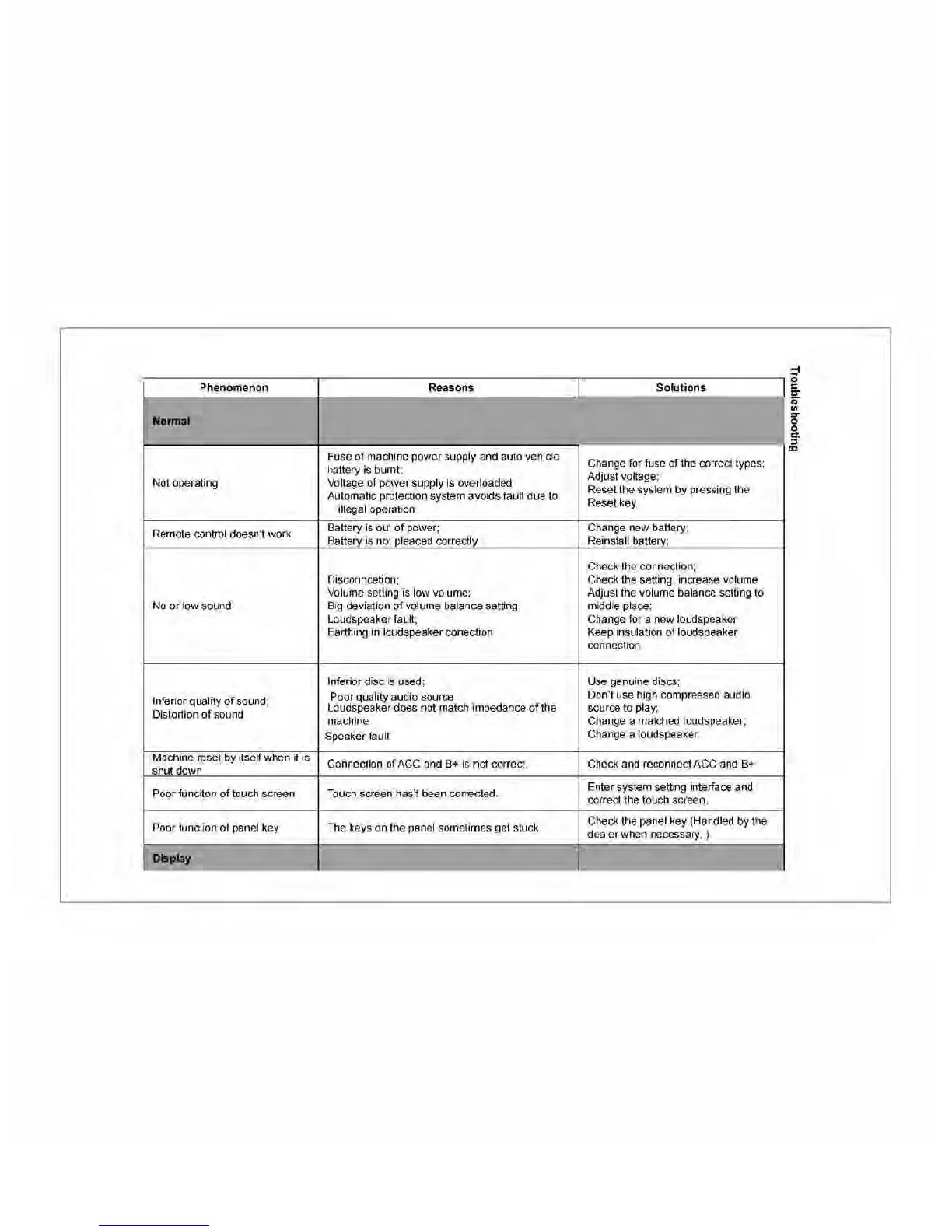
55
Phenomenon
Reasons
No
.....
1
Fuse
of
machine power supply and auto vehicle
hattery
is
burnt;
Not operating Voltage of power supply
is
overloaded
Automatic protection system avoids fault due to
illegal operation
Remote control doesn't work
Battery
is
out of power;
Battery is not pleaced correctly
Disconncetion;
Volume setting is low volume;
No
or low sound Big deviation of volume balance setting
Loudspeaker fault;
Earthing
in
loudspeaker conection
Inferior disc
is
used;
Inferior quality
of
sound;
Poor quality audio source
Distortion of sound
Loudspeaker does not match impedance
of
the
machine
Speaker fault
Machine reset by itself when it is
Connection of
ACe
and
B+
is
not
correct
shut down
Poorfunciton
of
touch screen Touch screen has't been corrected,
Poor function of panel key The keys on the panel sometimes get stuck
DIsplay
Solutions
Change for fuse
of
the correct types;
Adjust voltage;
Reset the system by pressing the
Reset key
Change new battery
Reinstall battery;
Check the connection;
Check the setting, increase volume
Adjust the volume balance setting to
middle place;
Change for a new loudspeaker
Keep insulation of loudspeaker
connection
Use genuine discs;
Don't use high compressed audio
source to play;
Change a matched loudspeaker;
Change a loudspeaker.
Check and reconnect ACC and
B+
Enter system setting interface and
correct the touch screen,
Check the panel key (Handled by the
dealer when necessary, )
~
o
C"
if
"
o
&
,
~



 To Next Page