23
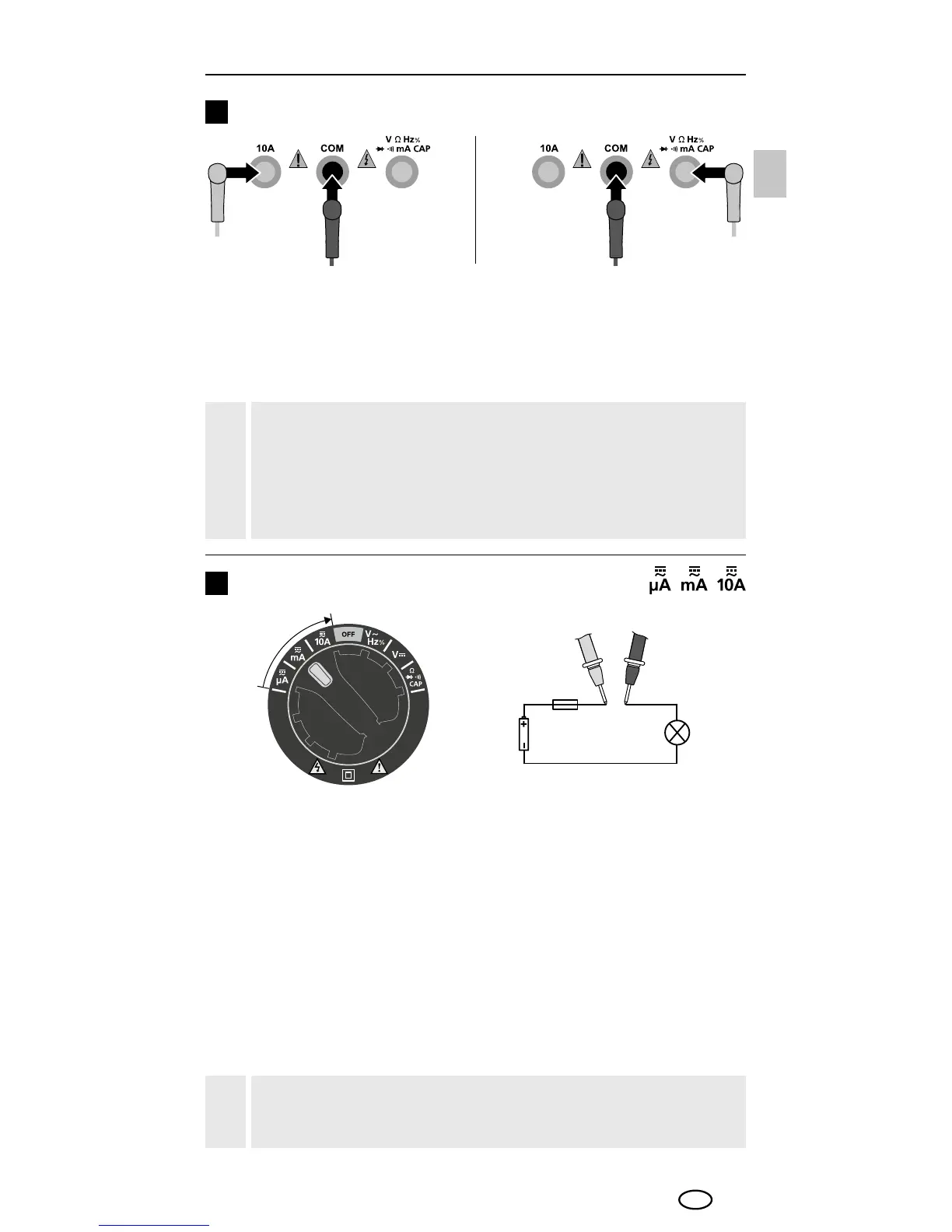
Connection of test prods
3
The black test prod (–) must always be connected to the "COM
socket". When taking current measurements, the red test prod (+)
must be connected to the input socket (4) on the left. For all other
measuring functions, the red test prod must be connected to the
input socket (2) on the right.
Please ensure that the test prods are connected correctly
before each measurement. Taking a voltage measurement
with 10 A current connectors plugged in or in the mA
range can cause the built in fuse to trip and damage the
measuring circuit.
!
Do not measure currents in the 10 A for longer than
30 seconds. This could damage the device or the test prods.
!
Current measurement DC/AC
4
To take a current measurement, turn the rotary switch to
position "μA", „mA“ or "10 A" and press the "Mode" button
to set the type of voltage (AC, DC). Ensure that the test prods
are connected correctly.
μA / mA = red input socket on right (+) (2)
10A = red 10A input socket (+) (4)
Disconnect the circuit before connecting the meter. Then connect
the measuring contacts to the object to be tested.
The measured value acquired and the polarity appear on the display.
Disconnect the circuit again before disconnecting the meter.
Red Black
EN




 To Next Page