25
Continuity test
9
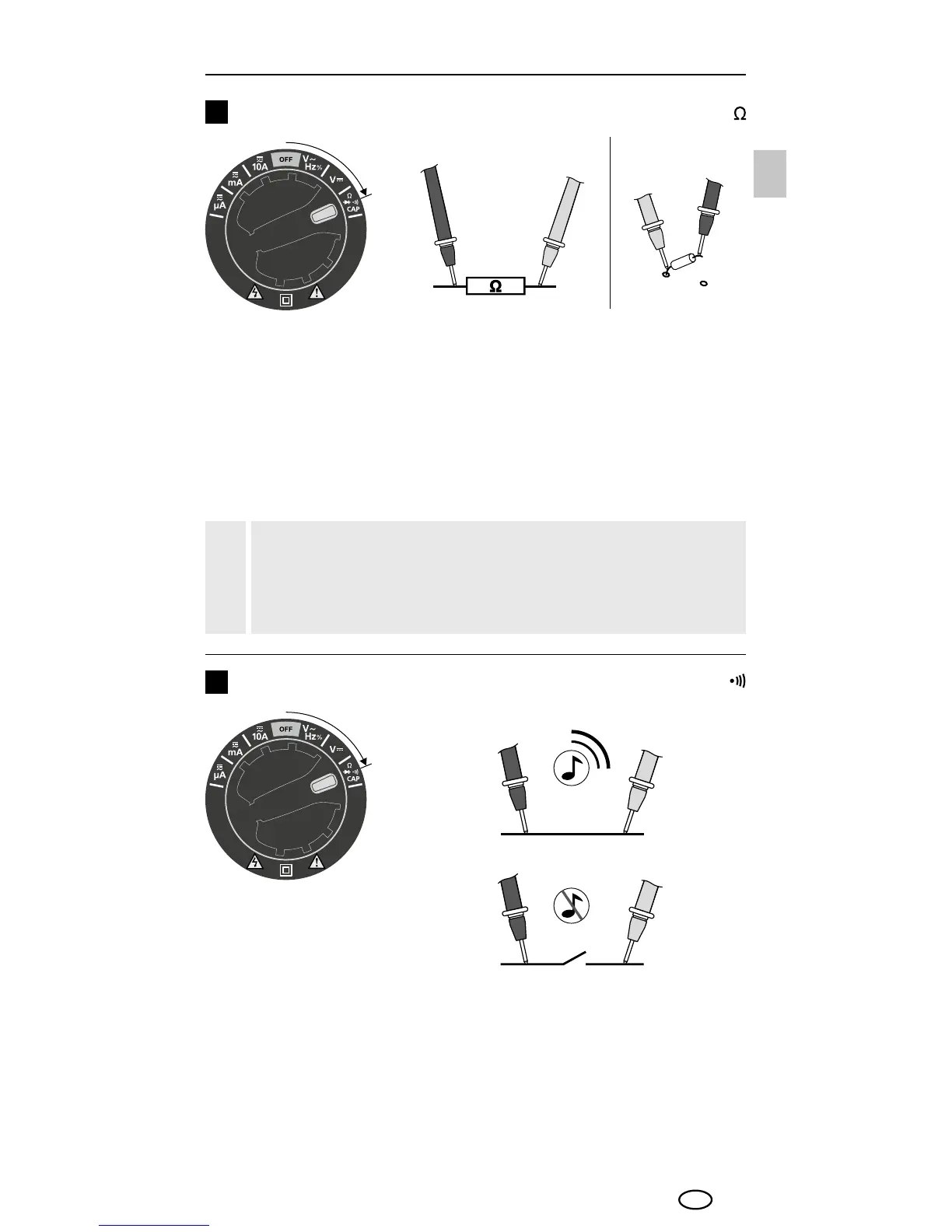
To check the continuity turn the rotary switch to position "Ω" and
press the "Mode" switch once to activate the „continuity check“
function. Then connect the measuring contacts to the object to be
tested. A measured value of < 50 ohms is recognised as continuity;
this is conrmed by an audible signal. If "O.L." appears on the
display instead of a measured value, either the measuring range
has been exceeded or the measuring circuit is not closed or has
been interrupted.
Resistance measurement
8
To measure the resistance, turn the rotary switch to position "Ω".
Then connect the measuring contacts to the object to be tested.
The measured value acquired appears on the display. If "O.L."
appears on the display instead of a measured value, either the
measuring range has been exceeded or the measuring circuit is not
closed or has been interrupted. Resistances can only be measured
correctly in isolation; therefore, the components might need to be
disconnected from the remainder of the circuit.
Red
Black
When measuring resistance, to avoid the risk of the results
of a measurement being distorted, there must be no traces
of dirt, oil, solder spray or other contamination on the
test prods.
!
Red
Black
EN




 To Next Page