14
14
3
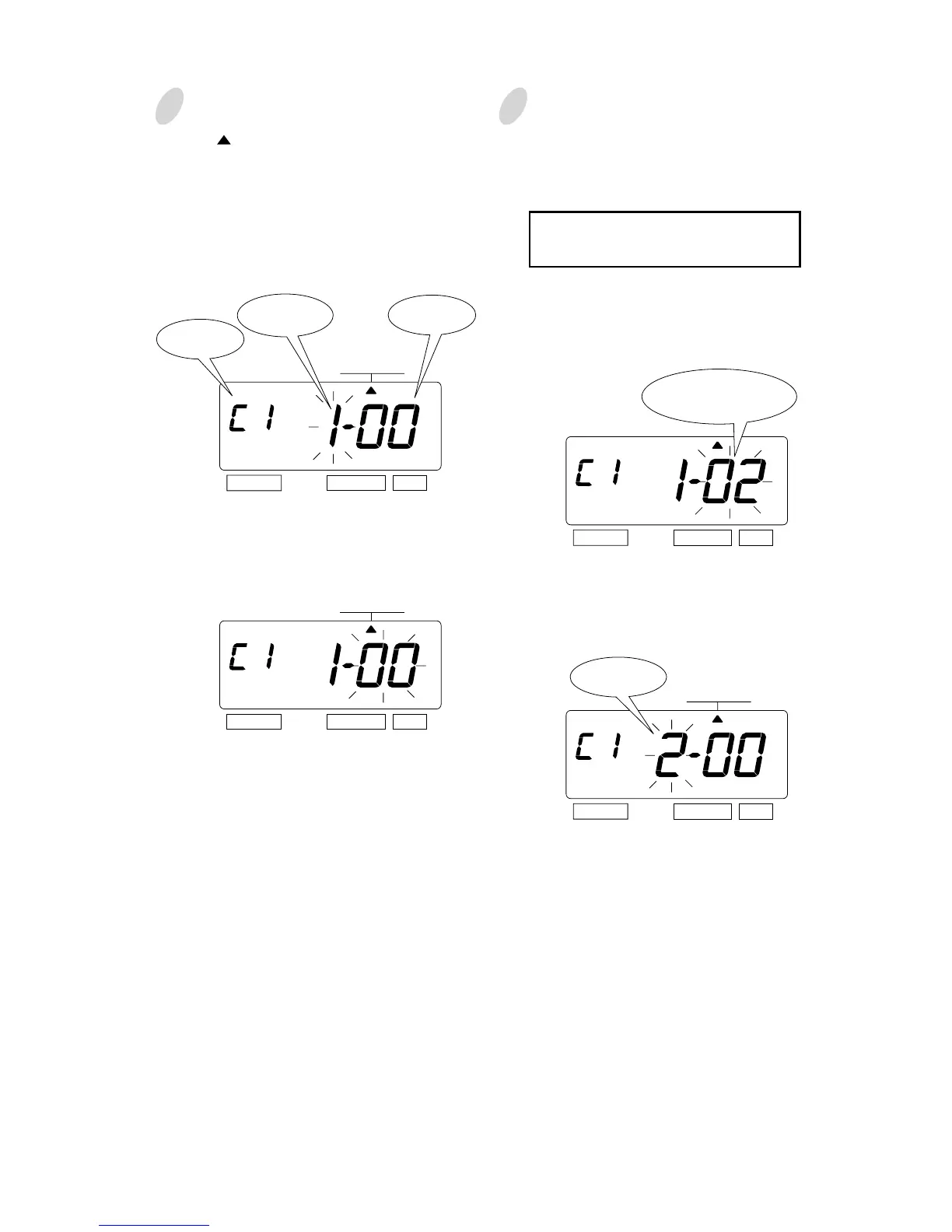
Press the [SELECT] button and position
the " " under the "COMMENT" mark.
Setting the 1st comment line.
At the moment, the flashing digit
indicates "Character Position". And then
press the [SET] button.
At the moment, the flashing changes
from "Character Position" to "Character
Code".
SELECT CHANGE SET
Comment
Line
Character
Code
COMMENT
COMMENT
COMMENT
SELECT CHANGE SET
SELECT CHANGE SET
4
Set the "Character Code".
In case of example, the 1st character is
"A", then enter the character code
"02".
Refer to the "25. CHARACTER
CODE FOR ALPHANUMERIC"
Press the [CHANGE] button until the
correct character code appears. And
then press the [SET] button.
At that moment, the "Character
Position" changes from the 1st
character to the 2nd character.
The character code
"02" means "A".
SELECT CHANGE SET
The 2nd
Character
Character
Position



 To Next Page