LAUNCH X-431IV English User’s Manual
13
♦ [HELP]: to display the help information.
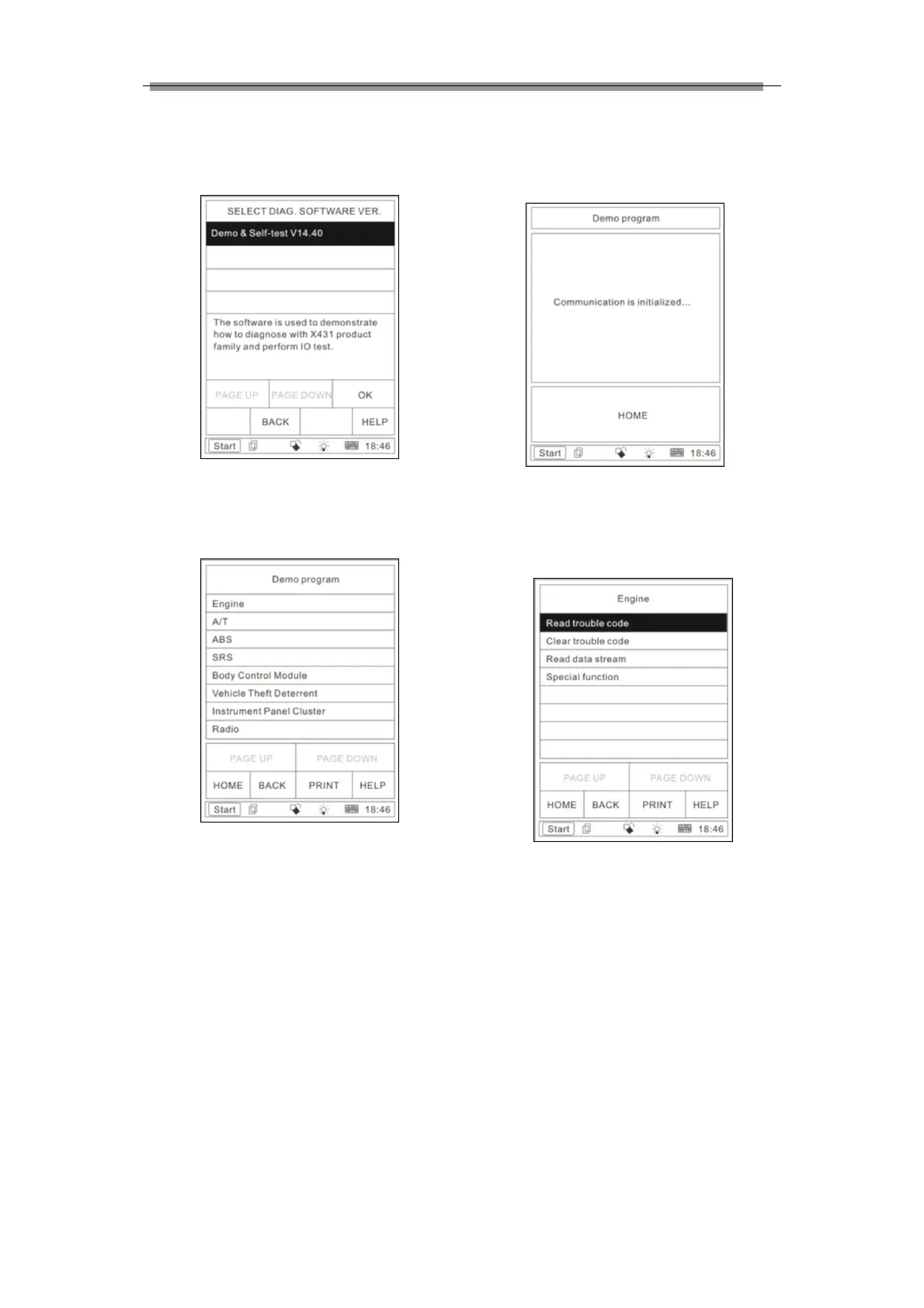
Click [Demo & Self-test V14.40]. The display
will be as shown in Figure 3-4.
Figure 3-4
Click [OK] button, the screen will display the
information as shown in Figure 3-5.
Figure 3-5
Note: The test operation for different systems
is similar. Here we take [Engine] as an
example to describe.
Button descriptions:
♦ [HOME]: to return to the homepage of
vehicle diagnosis.
♦ [BACK]: to return to the previous
interface.
♦ [PRINT]: to print the test result.
♦ [HELP]: to display the help information.
Click [Engine] button, the screen will display
the information as shown in Figure 3-6.
Figure 3-6
After communication is initialized, the screen
will display the information as shown in Figure
3-7.
Figure 3-7
3.2.2 Read trouble code
Click [Read trouble code] in the function menu,
X-431IV starts to test the fault code. The
screen will display the test result when the test
is finished. Figure 3-8 is an example of a test.



 To Next Page