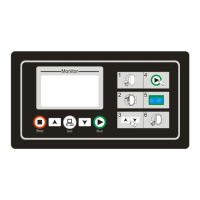
SX205100A Dryer Controller
5. Running
5.1. Startup
After power is on, the LCD shows the startup interface for 10 seconds. If press [Set] button for 3
seconds during the 10-second-display, you can enter into user parameter setup.
5.2. Idle mode
Not use temp. sensor of in drum Use temp. sensor of in drum
5.3. Automatic running mode
5.3.1. Start automatic running
On Idle interface, choose your desired program by pressing [Down] or [Up] buttons under “Door
Closed” status, and then press [Run] button to start the program.
Drying Cooling
The left of 1st line, display the current running program number.
The left of 2nd line, display the current running action.
The right of 1st line and 2nd line, display the time.
3rd line and 4th line, display the temperature of in drum and out drum.
5.3.2. Change time,temperature
Select the setting items by pressing [Set] button and set the value by pressing [Down] or [Up]
button.
5.3.3. Ending automatic running
After complete cool, the controller becomes ending status. The controller beeps on to clue user,
you can stop the buzzer by pressing [Stop] button during this beeping time.
Note: In the dry process, press [Stop] button to come into cool process. And in the cool process,
press [Stop] button to end the program.
10/16


 To Next Page