SX205100A Dryer Controller
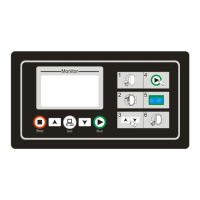
4. Buttons introduction
This schematic photo is just for reference!
Icon Function
[Start] button
Under “Door Closed” and “Idle” status, press this button to start executing the selected
automatic formula.
[Stop] button
1.Under “auto” Mode, press this button to stop current running formula.
2.When there is an error appeared in the machine, the computer will signal an alarm
automatically with audible sound. Pressing this button will stop audible alarm sound. Press
this button again after troubleshooting. If the error has been resolved or can be ignored, the
computer will go back to “Idle” status. Or else the controller will alarm again.
[Set] button
1.In the count down status, press this button for 3 seconds, you can enter into user
parameter setup.
2.In the idle status, press this button, you can enter into user program edit.
[Up] button
1. When running, you can change motor direction mode, single direction or bi-direction.
2. Under setting status, press this button to choose your desired item.
[Down] button
1. When running, you can change motor direction mode, single direction or bi-direction.
2. Under setting status, press this button to choose your desired item.
9/16


 To Next Page