This document describes the SX205100A Dryer Controller, a device designed for the automatic control of dryers, offering stability and reliability in operation.
Function Description:
The SX205100A Dryer Controller is specifically designed to manage the automatic operation of a dryer. It provides a user-friendly human-machine interaction interface with a liquid crystal display (LCD) that shows the machine's operational status, including temperatures, enhancing monitoring effectiveness. The controller allows for the programming of up to 5 different drying cycles. Once a cycle is selected, a single touch of the [Run] key initiates the automatic execution of the chosen cycle until its completion.
Important Technical Specifications:
The controller operates within an electric cabinet temperature range of -10°C to +50°C, requiring a ventilating fan when necessary. The input voltage range for the transformer is AC220V (±10%), and users are responsible for configuring the transformer if their input voltage falls outside this range. Voltage connected with relays should be ≤ AC220V (DC 24V), with a relay current of < 5A. The voltage outputs of the transformer are AC9.8V (loaded voltage), and should not be directly connected to AC220V. The temperature around the controller and connecting cables must be maintained below 60°C.
Programmable Parameters:
The controller supports 5 distinct programs. Each program can be customized with the following parameters:
- Dry parameters:
- Dry hour: 0-9 hours
- Dry min: 0-59 minutes
- Dry temp: 0-255°C (temperature of the out drum when drying)
- Cool parameters:
- Cool hour: 0-9 hours
- Cool min: 0-59 minutes
- Cool temp: 0-255°C (temperature of the out drum when cooling)
- Other parameters:
- Motor dir: BiDi (bi-direction) or SiDi (single direction) for motor rotation.
- Dry mode: Time (controller counts down regardless of dry temperature) or Temp (controller counts down when dry temperature is reached).
- DryInDrum: 0-255°C (temperature of the in drum when drying).
Machine Parameter Setup:
The controller allows for the configuration of various machine parameters, which are pre-set at the factory and should generally not be modified without specific requirements, as incorrect changes can lead to abnormal operation. These parameters include:
- Drum roll time: 0-255 seconds (time for motor forward/reverse run).
- Drum stop time: 0-255 seconds (time for motor forward/reverse stop).
- Heat1 temp dif: 0-255°C (temperature difference allowed for main heat to act).
- Heat2 temp dif: 0-255°C (temperature difference allowed for assistant heat to act).
- Door closed: N.O. (normally open) or N.C. (normally closed) for door closed input signal.
- Motor Overload: N.O. or N.C. for motor overload input signal.
- Overheat: N.O. or N.C. for overheat input signal.
- Emergency: N.O. or N.C. for emergency stop input signal.
- InDrumSensor: No or Yes (use temperature sensor in drum).
- In drum ctrl: No or Yes (control temperature in drum).
- In drum alarm: 70-180°C (maximum temperature in drum before alarm).
- OutDrumAlmDif: 1-30°C (difference for out drum temperature alarm; Max temperature of out drum = Diff. temp + Program Setting temp).
- Language: Chinese, English.
- Temp. units: Celsius, Fahrenheit.
Usage Features:
- Startup: Upon power-on, the LCD displays a startup interface for 10 seconds. During this period, pressing the [Set] button for 3 seconds allows entry into user parameter setup.
- Idle Mode: In idle mode, the display shows the selected program, current temperature, and whether the in-drum temperature sensor is in use.
- Automatic Running Mode:
- Start: From the idle interface, users can select a program using [Down] or [Up] buttons (when "Door Closed" status is active) and then press [Run] to start.
- Display during run: The display shows the current program number, running action (Drying/Cooling), remaining time, and temperatures of both in-drum and out-drum.
- Change time/temperature: During a running cycle, users can select setting items by pressing [Set] and adjust values using [Down] or [Up].
- Ending: After the cooling process is complete, the controller enters an "ending" status and beeps. Pressing [Stop] during this time stops the buzzer. Pressing [Stop] during the dry process initiates the cool process, and pressing [Stop] during the cool process ends the program.
- Programming: Users can select and edit programs after entering a password (default is empty). The program editing interface allows modification of dry, cool, and other parameters.
- Parameter Initialization: The controller allows resetting all parameters or programs to their default factory values through a dedicated menu.
- Password Modification: Users can change the password for accessing parameter setup.
Maintenance Features:
- Safety Precautions:
- The controller should be fixed to prevent vibration.
- Installation should be in a metal or non-flammable board.
- Avoid direct sunlight, strong airflow, mist, corrosive, or polluting gases.
- Ensure power supply is OFF before wiring.
- Wiring should be performed by professional workers, observing strong and weak electricity separation principles.
- Use technical standard wires and parallel connection methods.
- Do not inspect signals or change parameters while running.
- Do not approach the machine while running.
- Troubleshooting and Alarms:
- The controller signals alarms with an audible sound when an error occurs.
- Pressing [Stop] once stops the audible alarm. Pressing [Stop] again after troubleshooting (if the error is resolved or can be ignored) returns the controller to "Idle" status; otherwise, the alarm will reactivate.
- Common alarms include: OutDrumSensor, InDrumSensor, MotorOverload, Overheat, OutDrumTmpHi, InDrumTmpHigh, Emergency, Paramet. err, Program err, and System err. Each alarm has a corresponding troubleshooting step, such as checking temperature sensors, machine capacity, input signals, or contacting the factory for system/parameter errors.
- Repair: Users are advised to contact the manufacturer for any repair needs and not attempt repairs themselves.
- Physical Handling: Do not pull or twist power and communication lines. Avoid direct contact with the controller device.
- Simulation/Adjustment: Exercise caution when simulating and adjusting the controller on a desk, as high voltage can pose electrical hazards.
Responsibility Statement:
The manufacturer (PUNP) reserves the right to repair software bugs but does not undertake compensation for consequences. For hardware errors, PUNP has the right to repair but no duty to undertake responsibility. PUNP is not responsible for consequences arising from improper use or for providing end-user service.
This manual is subject to change without separate notification.

 Need help?
 General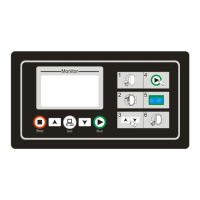

 To Next Page