SX205100A Dryer Controller
6. Programming
There are 5 programs on the controller.
6.1. Select and enter
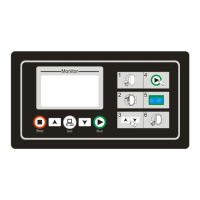
Select your desired program under “Idle” status by pressing [Down] or [Up] buttons, and pressing
the [Set] button, then the LCD will ask you to input the passwords.
After inputting correct passwords, it will enter into “program” status.
Default password is empty, you can enter the interface without entering passwords..
6.2. Edit
1st page 2nd page
Select the setting items by pressing [Set] button and set the value by pressing[Down] or [Up]
button.
Items Default Range Introduction
Dry parameters
Dry hour 1 0-9
Dry min 0 0-59
Dry temp
90℃ 0-255 ℃
Temperature of out durm when dry.
Cool parameters
Cool hour 0 0-9
Cool min 10 0-59
Cool temp 30 0-255 Temperature of out durm when cool.
Other parameters
Motor dir BiDi
BiDi、SiDi
BiDi:the motor rotating in bi-direction.
SiDi:the motor rotating in single direction
Dry mode Time
Time、
Temp
Time:The controller begin to count down regardless of
the dry temperature.
Temp:The controller begin to count down when reach
the dry temperature.
DryInDrum
120 ℃ 0-255 ℃
Temperature of in durm when dry.
6.3. Exit and save
If press the [Stop] button under “program” status, the controller will exit with saving the program.
11/16


 To Next Page