English
6
21
6 DESCRIPTION OF CONTROLS
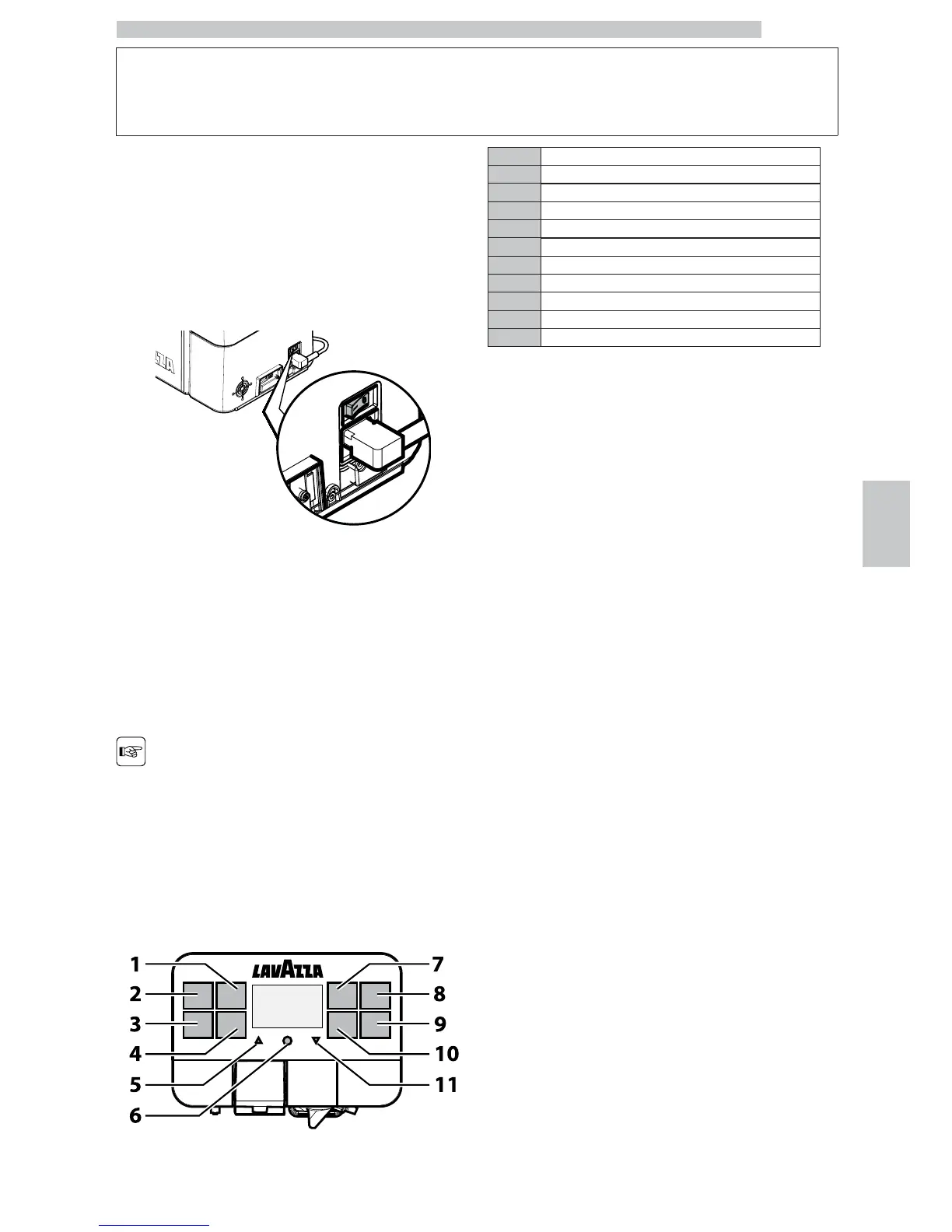
6.1 Power button
It is located in the lower left part in the rear of the
machine.
If set to the "I" position the machine turns on (electrical
functions enabled).
If set to the "O" position the machine turns off (electrical
functions disabled).
6.2 Display
The display shows the messages during normal operation
and during the programming and maintenance phase.
6.3 Keypad
The function of each button
changes according to the
change of the appliance
phase (ordinary dispensing
or programming phase).
1 "Double Espresso" button
2 "Espresso" button
3 "Caffè Crema" button
4 "Hot Water" button
5 "Up" button
6 "MENU/OK" button
7 "Coffee with milk" button
8 "Cappuccino" button
9 "Latte Macchiato" button
10 "Soluble" button
11 "Down" button
6.4 Button Description during
Normal Operation
"Double Espresso" button
Press this button to brew a double espresso. Press it twice
consecutively - within three seconds after the first time
you pressed it - to brew a long double espresso.
"Espresso" button
When this button is pressed, an espresso coffee is brewed.
Press it twice consecutively - within three seconds after
the first time you pressed it - to brew a long espresso.
"Caffè Crema" button
Press this button to brew a caffè crema.
"Hot Water" button
Press this button to dispense hot water.
"Up" button
Press this button to scroll down the user menu options.
"MENU/OK" button
Press this button to access the user menu, which allows
you to perform a few machine washing cycles
(Cappuccinatore and brew group) and to access the
maintenance menu. Once entered the menu, this button
allows you to confirm the selected menu option.
"Coffee with milk" button
Press this button to brew a coffee with a dash of milk.




 To Next Page