7.3 Log.txt
from your software (#ordernumber_donglenumber.lsf). Send this lsf-file as
attachment to the description of you problem by email to
service@lavision.de.
7.3 Log.txt
If you have a reproducible software problem in DaVis please generate a
log-file. This file contains all functions you have called and all error
messages that have been displayed after you have activated the log.
Please proceed as follows:
• Start DaVis and use the Macro/Clear Log file menu.
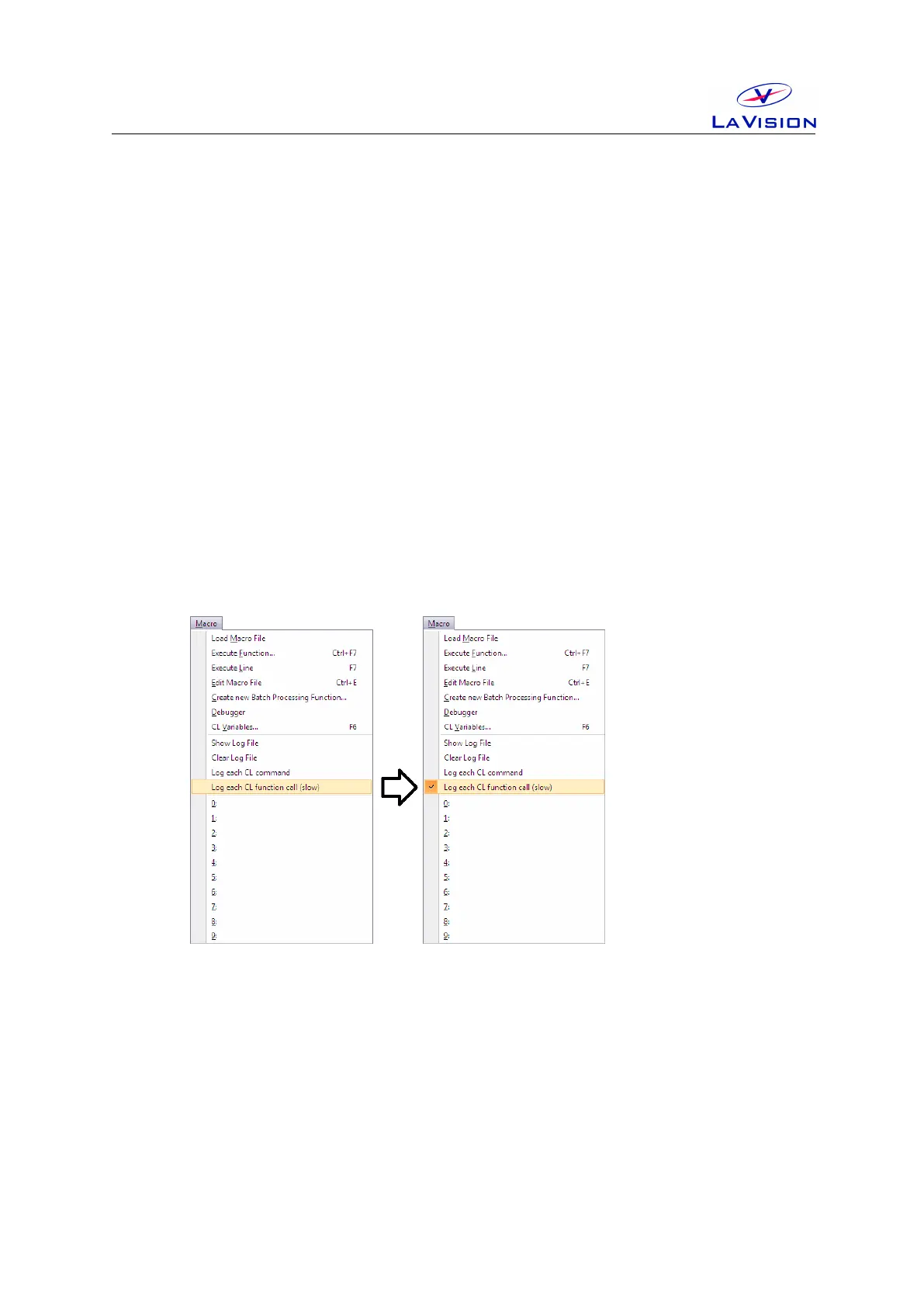
• Enable the Log each CL function call (slow) entry in the Macro
menu. This feature is active if you see a flag left next to the entry.
Every time you click on this entry its status is changed.
• Try to reproduce your problem, e.g. until an error message is
displayed.
• A log.txt file has been generated in the DaVis main directory.
Send this text file attached to your email.
• Disable the Macro/Log each CL function call (slow). This function
is deactivated if you don’t see a flag next to the entry.
25


 To Next Page