crystal User ManualVersion: 6.6.0/2190/459
10. Audio Mix Engine
Configuring MF Keys for Operator Control
Each source may be configured with an MF Key which will enable or disable the conference system. There are
a few possible options; this example uses the Conf Toggle parameter. As usual, there are three steps to
configure each MF Key:
1. Name the MF Key - this happens automatically when you name the source.
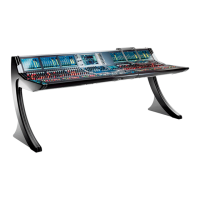
2. Assign the MF Key to the Conf 1 Toggle source parameter (from the Conf menu tab):
3. Assign the Conf 1 control signals to the MF Key lamp states (from the Keys menu tab):
Our example uses the Conf 1 off, Conf 1 in use and Conf 1 Audio control signals. This creates an MF Key
which will add or remove the source to/from the Conference 1 system, and illuminate in different colors to
indicate the conference state. See Source -> Conf for more parameter and status options.


 To Next Page