crystal User ManualVersion: 6.6.0/2366/459
19. Configuring Custom Logical Behaviour
19.25 TFF (Toggle Flip Flop)
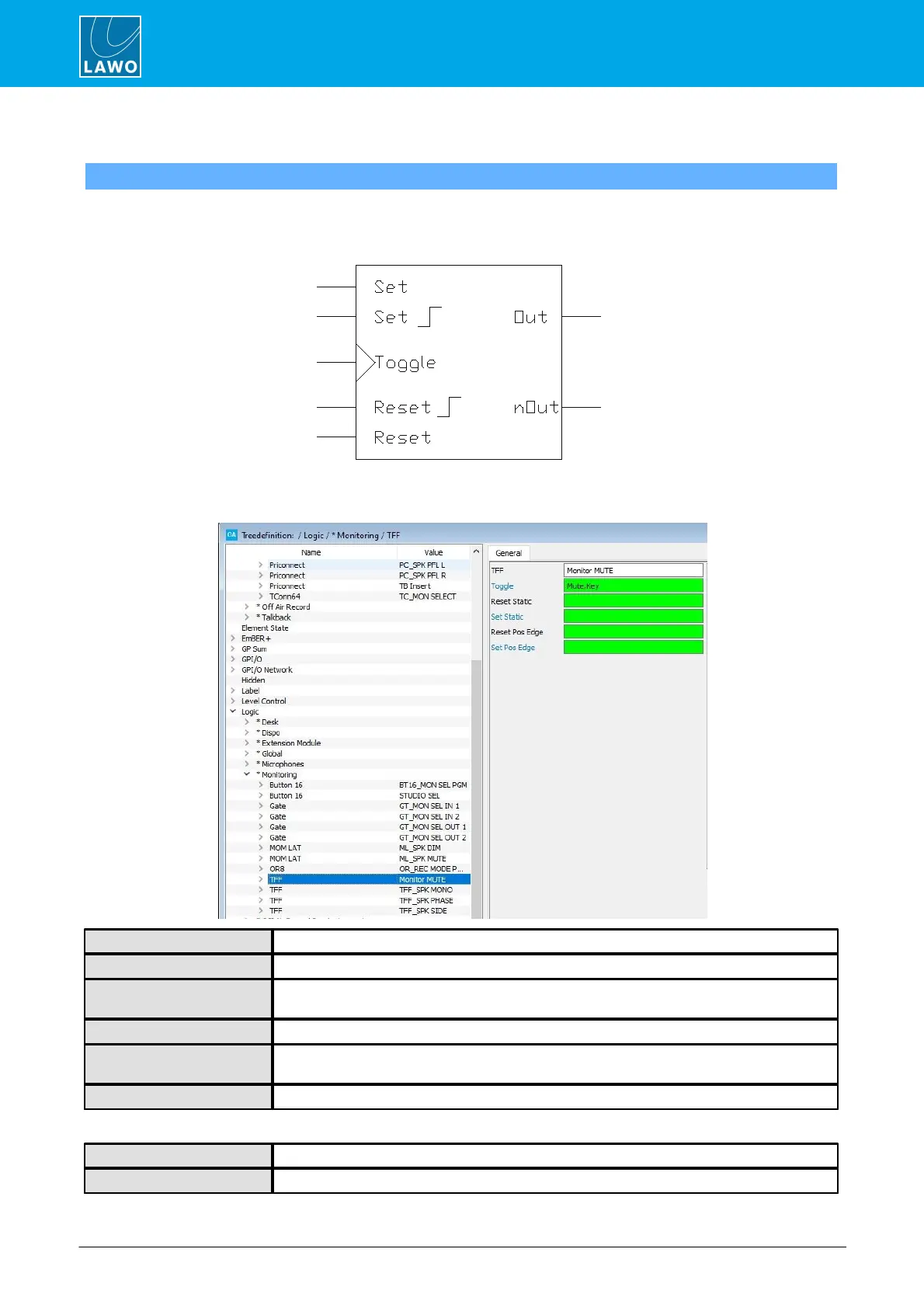
A TFF element is a Toggle Flip Flop. When a positive edge arrives at the input signal, this triggers a change of
state at the output. A common application is to create a latching MF Key.
General Parameters
Reference name for the element.
Assigns the input control signal to be toggled.
This input control signal will force a reset (i.e. set the control output to “0”). The reset is active
as long as the input control signal = logical “1”.
As above, but this time the control output is set to “1”.
This input control signal will force a reset (i.e. set the control output to “0”). The reset is
triggered from the rising edge of the input control signal.
As above, but this time the control output is set to “1”.
The control outputs appear under the “Logic -> <GroupName> -> TFF” branch of the 'Tree Selection' window:


 To Next Page