PAGE 7
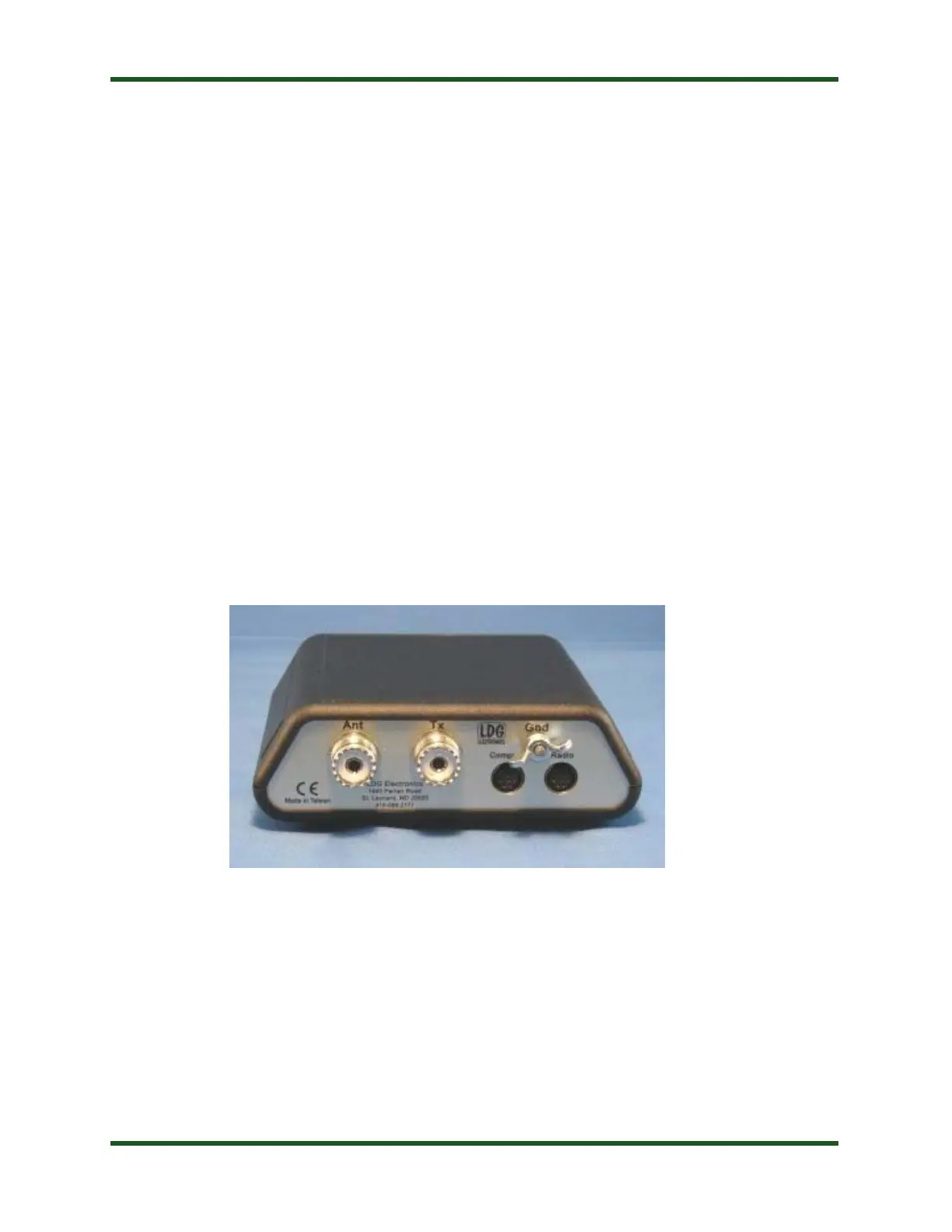
Rear Panel
The rear panel of the Z-817 features five connectors.
•
ANT connector: Connect the 50-ohm coax antenna feedline to this standard SO-239
connector.
•
TX connector: Connect the 50-ohm coax jumper cable from this standard SO-239 connector
to the ANT jack on the back of the transceiver.
•
Computer connector: This 8-pin mini-DIN connector connects to a personal computer via
Yaesu’s CT-62 cable or similar computer-to-CAT interface cable. Use of this port is optional; it is
provided for those hams who would like to control their FT-817 via computer. This is a pass-thru
port to the Radio port, and is switched under software control by the Z-817’s microprocessor. The
firmware of the Z-817 has been written such that this will seem transparent to the user -- if using
CAT to control your FT-817, just plug the PC’s CAT cable into this port instead of the CAT jack
on the back of the FT-817.
•
Radio connector: This 8-pin mini-DIN connector is for connection to the FT-817’s CAT
(“ACC”) jack. The Z-817 controls the PTT, power level, and operating mode via CAT commands
sent to the FT-817. The Z-817 also reads the operating frequency directly from the FT-817 so that
it knows where to store tuning memory data.
•
GND connector (5/16” nut): Connect to antenna system ground.


 To Next Page