05. ProTuner - CS1, CS2RS Series
171
• Click “Connect” button and wait a few seconds. If the drive has been successfully connected, the
screen will be automatically displayed with the Series and Drive Model as shown in Figure 3.
Otherwise, the following error message will be displayed (Figure 3).
< Figure 3: Communication error message >
If the wrong COM port is selected or the drive is not powered on, the following window will pop
up. (Figure 4)
< Figure 4: Communication error message >
5. 드라이버 파라미터 관리
Settings and configurations of the connected CS1-D closed loop stepper drive are all stored in
parameters. They can be read, changed, and saved through the “Motion Studio” CS1-D software.
5.1 파라미터 읽기
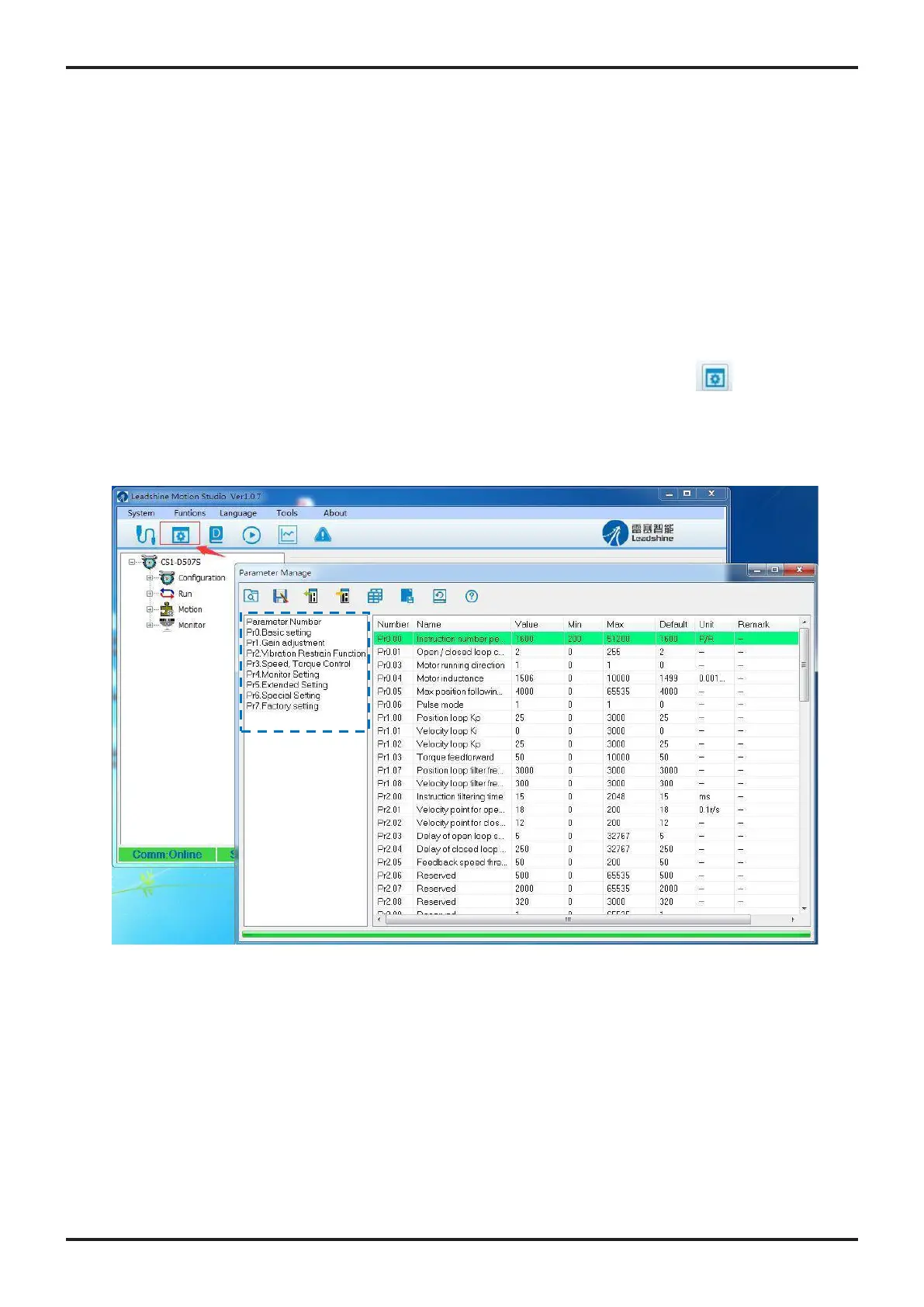
After the drive is connected successfully connected to computer, after clicking icon on the tool
bar, current settings of the CS1-D drive will be automatically uploaded and displayed (Figure 5).
Or the parameters window can also be opened any time by clicking the “Configuration →
Parameters list” on the menu bar 2.
< Figure 5: Parameters >
5.1.1. Filter Displayed Parameters
On the left of parameters manage window, you can use filter the displayed parameters.
(Figure 5, In the blue box)










 To Next Page