--
__
LEAR
SIEGLER, INC.
DATA PRODUCTS DIVISION
Table
3-3.
Set-Up
Moae
-
Terminal
Configuration
Parameters
(continued)
·Indicates
default
confiiguration
settings.
PARAMETE
RS
SELECTABLE
(DISPLAYED AS)
SETTINGS
DESCRIPTION
E
L~
MODE
(cont'd)
202
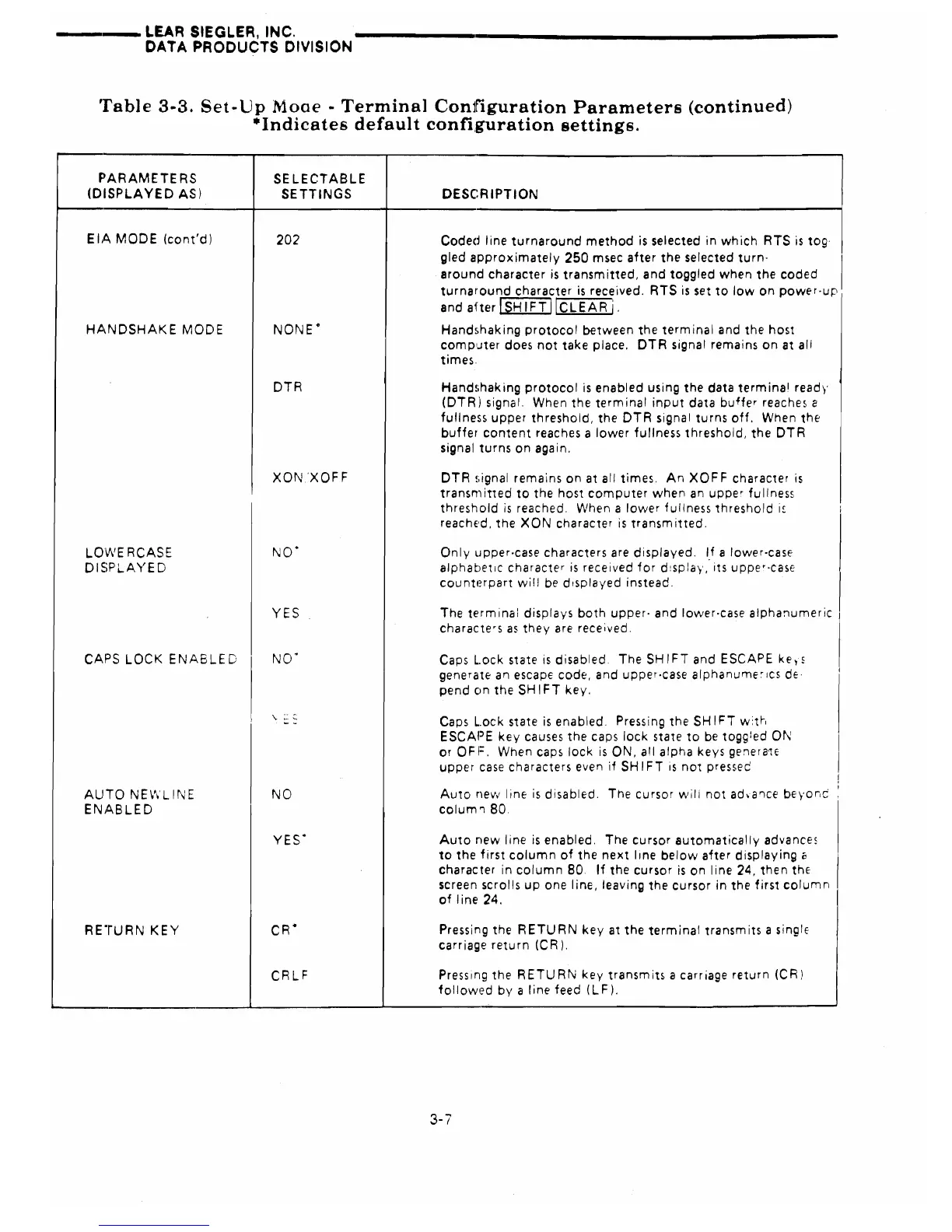
Coded line
turnaround
method
is
selected
in
which RTS
is
tog·
gled
approximately
250
msec
after
the
selected turn- I
around character
is
transmitted, and toggled when the coded
turnaround
character
is
received. RTS
is
set
to
low on power-up
and
aher
I
SH
1FT
IlcLEAR
i.
HANDSHAKE
MODE
NONE·
Handshaking protocol between the terminal and the host
comp'Jter does not take place.
DTR signal remains on at
all
times.
DTR
Hand!ihak
ing
protocol
is
enabled using the data term ina
l
ready
(DTR) signal. When the terminal input data buffer reaches
e
fullness upper threshold, the DTR signal turns off. When the
buffer
content
reaches a lower fullness threshold,
the
DTR
signal turns on again.
XON
'XOF F
DTR
!,ignal
remains on at
all
times. An XOFF character
is
transm itted
to
the host
computer
when
an
upper
fu
IIness
threshold
is
reached.
When a lower fullness threshold
i~
i
reached. the
XON
character
is
transmitted.
LOWERCASE
NO'
Only lJpper-case characters are displayed.
If
a lower-case
DISPLAYED
alphabetiC character
is
received for d!spJay " its
upper·CaSE
counterpart
wi!!
be
displayed instead.
YES
The terminal displays both upper· and lower-case alphanumeric
characters
as
they are received.
CAPS
LOCK
ENABLED
NO·
Caps
L.ock
state
is
disabled The SHIFT and ESCAPE
ke,s
generate an escape code, and upper-case
alphanume~lcs
dE'
I
pend on the
SH
1FT
key.
,
"
~
~
Caps
L.ock
state
is
enabled.
Pressing the SHIFT w:th
ESCAPE key causes the caps lock state to
be
toggled
ON
or OFF. When caps lock
is
ON,
all
alpha keys genera'iE
I
upper case characters even
if
SH
IFT
is
not pressec
NO
Auto
nell,'
Iine
is
disabled.
The cursor wili not ad.a'lce beyor,c
!
AUTO NEWLINE
ENABLED
colum'l80.
I
YES·
Auto new line
is
enabled.
The cursor automatically advances
to
the first column of the next line below after displaying c
character
in
column
80
If
the cursor
is
on line 24, then
thE
screen scrolls up one line, leaving the cursor
in
the first column
of line 24.
RE"rURN
KEY
CR·
Pressing the RETURN key at the terminal transmits a single
carriage return (CR).
CRLF
Pressing the RETURN key transmits a carriage return (CR)
followed by a line feed (LF).
3-7



 To Next Page